CInternetSession 的头文件 :
#include <afxinet.h>CInternetSession 的头文件 :
#include <afxinet.h>VS2013添加自定义资源,在资源视图上点击右键,添加资源。
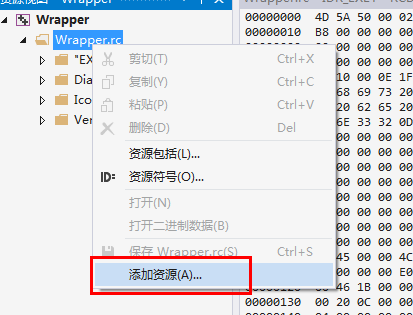
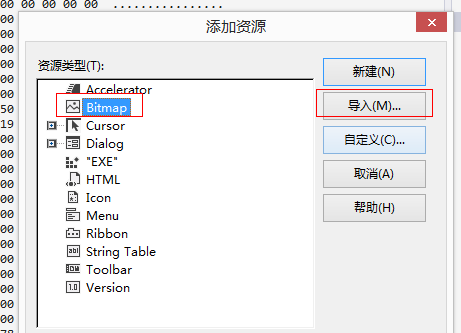
随便选一个,比如bitmap类型,并点击导入。
在打开的选择文件窗口选择“所有文件类型”
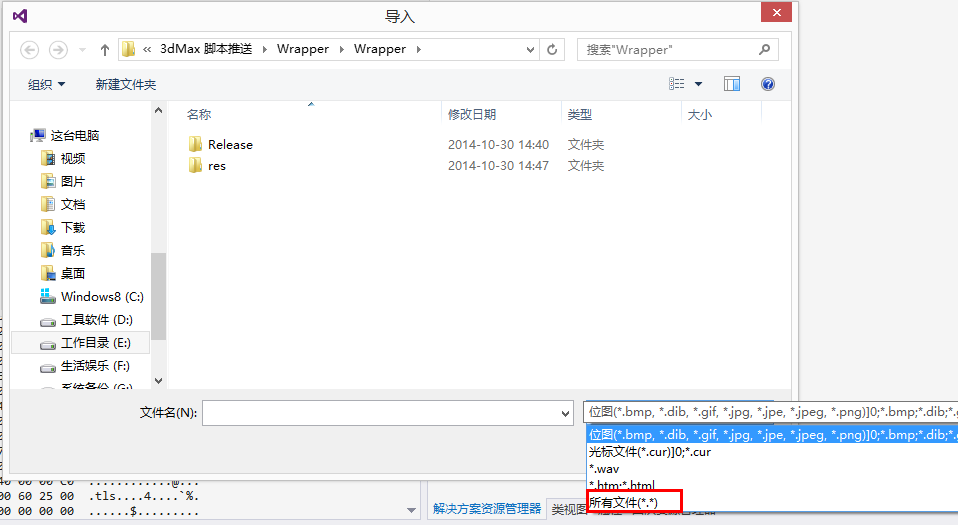
选择我们要导入的文件,并确定。
这时会弹出一个圣诞框,要求输入自定义类型名。输入名称后,自定义文件便被导入进来。
WIN32获取公网IP的代码:
Utility.h
#pragma once
class CUtility
{
public:
       CUtility();
       ~CUtility();

public:
        DWORD HttpGet( LPCTSTR lpszFullUrl, char *pBuffer, int iBufferSize);
        void GetPublicIp( TCHAR *pIP, int len);
};
Utility.cpp
#include "stdafx.h"
#include "Utility.h"
#include "Transcode.h"
#include<wininet.h>
#pragma comment (lib ,"wininet.lib" )


CUtility::CUtility()
{
}


CUtility::~CUtility()
{
}

void CUtility ::GetPublicIp(TCHAR *pIP, int len)
{
        char szBuffer[1024];
       memset(szBuffer, 0, sizeof( char) * 1024);
       HttpGet( _TEXT( "http://city.ip138.com/ip2city.asp" ), szBuffer, 1024);

        char* begin = strstr(szBuffer, "[")+1;
        char* end = strstr(begin, "]");
        int offset = end - begin;
       begin[offset] = '\0';
        char *ip = begin;

       std:: wstring wip;
        Transcode::ANSI_to_Unicode(ip, offset, wip);

       wcsncpy_s( pIP, len, wip.c_str(), offset);
}

DWORD CUtility ::HttpGet(LPCTSTR lpszFullUrl, char *pBuffer, int iBufferSize)
{
        if ( lpszFullUrl == NULL )
               return 0;

        HINTERNET hNet = :: InternetOpen(_TEXT ("Mozilla/5.0 (Windows NT 6.3; WOW64; rv:33.0) Gecko/20100101 Firefox/33.0"),
               PRE_CONFIG_INTERNET_ACCESS,
               NULL,
               INTERNET_INVALID_PORT_NUMBER,
              0);
        if (hNet == NULL)
       {
               //TRACE(_T("error: InternetOpen发生异常. 错误代号: %s; 文件: %s; 行: %d/n"), ::GetLastError(), __FILE__, __LINE__);
               return 0;
       }

        HINTERNET hUrlFile = :: InternetOpenUrl(hNet,
               lpszFullUrl,
               NULL,
              0,
               INTERNET_FLAG_RELOAD,
              0);

        if (!hUrlFile)
       {
               //TRACE(_T("error:InternetOpenUrl发生异常. 错误代号: %s; 您可能需要添加\"Http://\" 或 \"Ftp://\" 文件: %s; 行: %d/n"), ::GetLastError(), __FILE__, __LINE__);
               return 0;
       }

       ::memset( pBuffer, 0, iBufferSize);
        DWORD dwBytesRead = 0;
        char szTemp[1024] = { 0 };
        DWORD dwTotalReadBytes = 0;
        while (InternetReadFile(hUrlFile, szTemp, sizeof(szTemp) - 1, &dwBytesRead))
       {
               if (0 == dwBytesRead)
                      break;
              szTemp[dwBytesRead] = 0; //此处非常重要,缺了这一句可能抓的内容就不正确

               // 缓冲区大小不够时,停止向目的缓冲区复制数据,跳出
               if (dwTotalReadBytes + dwBytesRead >= ( UINT) iBufferSize)
              {
                      pBuffer[ iBufferSize - 1] = 0;
                      break;
              }

              strcat_s( pBuffer, 1024, szTemp);
               ZeroMemory(szTemp, sizeof (szTemp));

              dwTotalReadBytes += dwBytesRead;

       }

       ::InternetCloseHandle(hUrlFile);
       ::InternetCloseHandle(hNet);
        return dwTotalReadBytes;
}
VC 实现 Url 编码:(unicode版本)
CString UrlEncode(CString strUnicode )
{
        LPCWSTR unicode = T2CW( strUnicode);
        int len = WideCharToMultiByte( CP_UTF8, 0, unicode, -1, 0, 0, 0, 0);
        if (!len)
               return strUnicode;
        char *utf8 = new char[len + 1];
        char *utf8temp = utf8;
       WideCharToMultiByte( CP_UTF8, 0, unicode, -1, utf8, len + 1, 0, 0);
       utf8[len] = NULL;
        CString strTemp, strEncodeData;
        while (*utf8 != '\0')
       {
              strTemp.Format( _T( "%%%2x"), (BYTE )*utf8);
              strEncodeData += strTemp;
              ++utf8;
       }

        delete[]utf8temp;

        return CString(strEncodeData);

}VC使用CURL静态库:
使用CURL静态库的时候,要在VS中预处理器中添加宏:CURL_STATICLIB
否则会报无法解析的xxx函数,即,未找到静态库里的函数。
VC跨进程实现自动托放
//这个版本在64位系统上会造成目标进程闪退。
void test()
{
	char szFile[] = "d:\\jinkexy.mse";
	HWND hWnd = ::FindWindowA("3DSMAX", NULL);
	if (hWnd == NULL) return;

	DWORD dwBufSize = sizeof(DROPFILES) + sizeof(szFile) + 1;
	BYTE *pBuf = NULL;
	LPSTR pszRemote = NULL;
	HANDLE hProcess = NULL;
	__try {
		pBuf = new BYTE[dwBufSize];
		if (pBuf == NULL) __leave;
		memset(pBuf, 0, dwBufSize);
		DROPFILES *pDrop = (DROPFILES *)pBuf;
		pDrop->pFiles = sizeof(DROPFILES);
		strcpy((char *)(pBuf + sizeof(DROPFILES)), szFile);
		DWORD dwProcessId;
		GetWindowThreadProcessId(hWnd, &dwProcessId);
		hProcess = OpenProcess(PROCESS_VM_OPERATION | PROCESS_VM_WRITE, FALSE, dwProcessId);
		if (hProcess == NULL) __leave;
		pszRemote = (LPSTR)VirtualAllocEx(hProcess, NULL, dwBufSize, MEM_COMMIT, PAGE_READWRITE);
		if (pszRemote == NULL) __leave;
		if (WriteProcessMemory(hProcess, pszRemote, pBuf, dwBufSize, 0))
			::SendMessage(hWnd, WM_DROPFILES, (WPARAM)pszRemote, NULL);
	}
	__finally {
		if (pBuf != NULL) delete[]pBuf;
		if (pszRemote != NULL) VirtualFreeEx(hProcess, pszRemote, dwBufSize, MEM_FREE);
		if (hProcess != NULL) CloseHandle(hProcess);
	}
}


//这个版本可以正常使用,和操作系统位数无关
/**
* Dia is running, so we simulate a drag & drop event.
* Uses __argv & __argc for list of files to drop.
*/
int CWork::DragAndDropDia(HWND hWnd)
{
	if (hWnd == NULL)
	{
		//char szFile[] = MSE_FILE;
		hWnd = ::FindWindowA("3DSMAX", NULL);
		if (hWnd == NULL)
		{
			AfxMessageBox(_TEXT("请先打开3dsmax窗口"));
			return -1;
		}
		}

		char szFile[MAX_PATH];
		GetModuleFileNameA(NULL, szFile, MAX_PATH);
		PathRemoveFileSpecA(szFile);
		strcat_s(szFile, MAX_PATH, "\\maxscript.mse");

		// int iNumFiles = (gUseRegVal) ? __argc - 1 : __argc - 2;
		int iNumFiles = 1;
		int iCurBytePos = sizeof(DROPFILES);
		LPDROPFILES pDropFiles;
		HGLOBAL hGlobal;
		int i;

		/* May use more memory than is needed... oh well. */
		hGlobal = GlobalAlloc(GHND | GMEM_SHARE,
		sizeof(DROPFILES) +
		(_MAX_PATH * iNumFiles) + 1);

		/* memory failure? */
		if (hGlobal == NULL)
		return -1;

		/* lock the memory */
		pDropFiles = (LPDROPFILES)GlobalLock(hGlobal);

		/* set offset where the file list begins */
		pDropFiles->pFiles = sizeof(DROPFILES);

		/* no wide chars and drop point is in client coordinates */
		pDropFiles->fWide = FALSE;
		pDropFiles->pt.x = pDropFiles->pt.y = 100;
		pDropFiles->fNC = FALSE;

		//for (i = (gUseRegVal) ? 1 : 2; i < __argc; ++i)
		//{
		// strcpy(((LPSTR)(pDropFiles)+iCurBytePos), __argv[i]);
		// /**
		// * Move the current position beyond the file name copied.
		// * +1 for NULL terminator
		// */
		// iCurBytePos += strlen(__argv[i]) + 1;
		//}
		strcpy(((LPSTR)(pDropFiles)+iCurBytePos), szFile);
		iCurBytePos += strlen(szFile) + 1;


		((LPSTR)(pDropFiles))[iCurBytePos] = 0;
		GlobalUnlock(hGlobal);

		/* Force dia to the foreground */
		SetForegroundWindow(hWnd);

	/* restore only if minimized */
	if (IsIconic(hWnd))
	{
		ShowWindow(hWnd, SW_RESTORE);
	}

	//AfxMessageBox(L"准备发送消息");

	/* send the file list */
	::PostMessage(hWnd, WM_DROPFILES, (WPARAM)hGlobal, 0);


	//::GlobalFree(hGlobal);
	return 0;
}
让VC编译出来的程序不依赖于msvcr80.dll/msvcr90.dll/msvcr100.dll等文件
正常情况下,当我们用VC编译出一个Console/Win32类型项目的exe程序时(这里暂不考虑MFC程序),会依赖于msvcrxx.dll文件(xx为不同VC对应的版本号,VC2005为80,VC2008为90,VC2010为100),发布程序的时候,就需要把对应的dll也copy过去,比较不方便。
通过以下的方法,可以让exe不依赖于这些dll(不过生成的exe会大很多)
以VC2010英文版为例,切换到Solution Explorer视图,在项目上右击,选择Properties,Configuration选项选中Release,依次点击Configuration Properties->C/C++->Code Generation->Runtime Library,选择/MT即可。以Release方式重新Build项目,在Release文件夹下即可生成不依赖于msvcr100.dll的exe文件。
下面简单说明Runtime Library四个选项的含义:
(D表示Dll,而d表示debug版本)
MT(Multi-threaded):多线程版本
MTd(Multi-threaded debug):多线程调试版本
MD(Multi-threaded Dll):多线程Dll版本
MDd(Multi-threaded Dll debug):多线程调试Dll版本
VC++启动进程并隐藏窗口
HDESK hDesk = CreateDesktop(_T("MyDesk"), NULL, NULL, 0, GENERIC_ALL, NULL);
_ASSERT(hDesk);
STARTUPINFO si = {sizeof(si)};
si.lpDesktop = _T("MyDesk");
si.dwFlags = STARTF_USESHOWWINDOW;
si.wShowWindow = SW_HIDE;
PROCESS_INFORMATION pi = {0};

if(CreateProcess(NULL, pCmdLine, NULL, NULL, FALSE, 0, NULL, NULL, &si, &pi))
{
	HANDLE hProcess=pi.hProcess;
	CloseHandle(pi.hThread);
	if (WaitForSingleObject(hProcess,INFINITE)!=WAIT_FAILED)
	{
		DWORD dwExitCode;
		GetExitCodeProcess(hProcess,&dwExitCode);
		if (dwExitCode==STILL_ACTIVE)
			MessageBox(NULL, "thread still alive !", "debug", MB_OK);
	}
	CloseHandle(pi.hProcess);
	CloseDesktop(hDesk);
}通常 object 到 string 有四种方式(假设有object obj):obj.ToString()、Convert.ToString()、(string)obj、obj as string。他们都能将 object 对象转换成 string 对象。我就讲讲他们的异同以及在实际中应该使用哪个。
前两个方法通常是由别的对象得到 string 对象,它们间的区别只表现在要转换的对象为 null 时,如果 obj 为 null,调用 obj.ToString 方法会导致 NullReferenceException 异常,调用 Convert.ToString 不会抛出异常而返回一个 null。
用强制转换(string)obj 要求 obj 的运行时类型必须是 string。如果不是,就会抛出异常。
用 as 方法则会相对平稳,当 obj 的运行时类型不是 string 时会返回 null 而不抛出异常。
所以在通常在我们需要得到某个对象的 string 表达形式时,我们应该使用 ToString 和 Convert.ToString,这时候你就得根据情形选一个,假如你能保证你的对象不为 null,则两个差不多。如果有可能为null,你就应该用 Convert.ToString,如果你希望它为 null 的时候抛出异常,那么当然可以选择 ToString。
编者注:
这里是说 object 到 string,如果在其它类型上调用第一种 ToString(),得到的不一定是实际的内容,可能是对该类的描述,这取决于该类如何实现ToString() 方法
VC ADO ACCESS LIKE查询:
vc 下调用access ,*变成%使用
ADO就认%的