nginx反代Dash程序报错

昨天收到一个客户求助,用python dash框架开发的程序运行报错了。

客户发来的浏览器控制台报错信息如下:
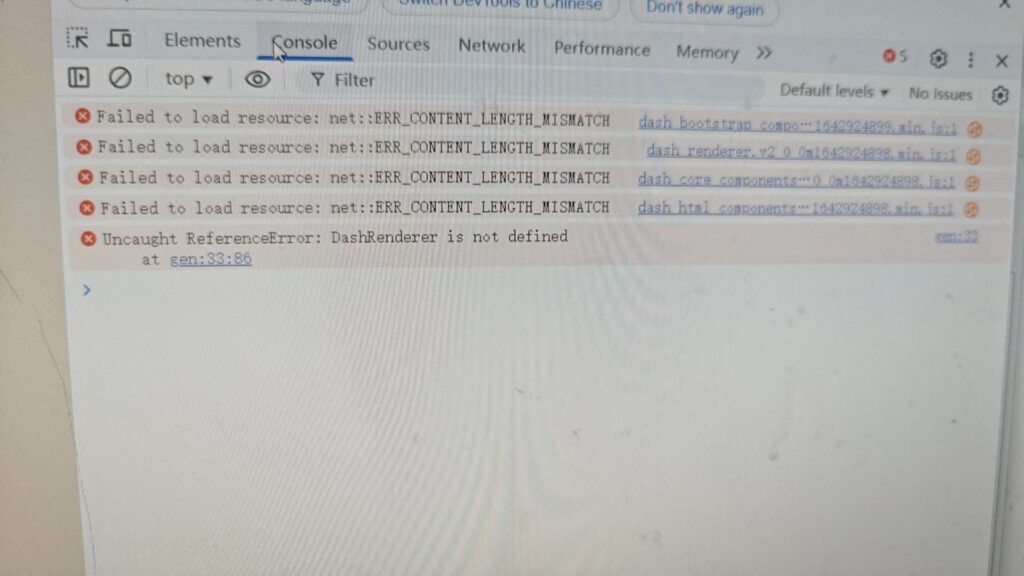
我们可以看到错误信息是:

Failed to load resource: net::ERR_CONTENT_LENGTH_MISMATCH
Uncaught ReferenceError: DashRenderer is not defined

主要是ERR_CONTENT_LENGTH_MISMATCH这个错误,这个错误通常表示服务器返回的 Content-Length 头指定的内容长度与实际传输的长度不一致。原因可能有:

  • 文件未完整上传或被损坏
  • 被代理服务器(如 Nginx)截断
  • 服务端 gzip 压缩配置错误
  • 虚拟环境中的某些包没有正确安装或版本不匹配

查看了一下服务器环境,是通过nginx反代dash来运行的,首先排除是否是gzip压缩导致的,通过在nginx添加配置gzip off关掉gzip压缩,发现问题仍然存在。

然后尝试关闭nginx缓存:

proxy_buffering off;

问题解决!!

🔧 proxy_buffering off; 的作用

默认情况下,Nginx 会先把后端服务器的响应内容缓存到内存或磁盘中,等缓冲区装满或者传输结束后,再统一返回给客户端。这就是所谓的“响应缓冲”。

而设置:proxy_buffering off;则是告诉 Nginx:“不要缓存响应数据,而是直接把后端返回的数据一点一点地实时转发给客户端。”

在客户发来的错误截图中,可以看到,Dash 应用中,浏览器需要加载很多 JS 资源,比如:dash_core_components.min.js、dash_renderer.min.js,这些资源文件一般通过 Flask(或 Dash)后台动态提供给浏览器。如果 Nginx 开启了 proxy_buffering,但配置不当(例如 Content-Length、gzip 等不一致),就可能导致:

  • 浏览器收到的数据长度不对(出现 ERR_CONTENT_LENGTH_MISMATCH)
  • JavaScript 文件加载失败,从而导致 DashRenderer is not defined

关闭 proxy_buffering 后,Nginx 不再尝试缓存和处理这些文件,而是原样转发给浏览器,避免了出错。

nginx https配置模板

server {
    listen 443 ssl http2 default_server;
    server_name  notes.wujie.me;
    root /var/www/notes.wujie.me;
    index  index.html index.htm index.php;

    #文件上传大小限制  必须要放在server下的server_name下
    client_max_body_size 200m;

    # 因为是默认的 https 站点,所以有可能是从 IP 进来的请求,那么把它跳转到域名
    if ($host != 'notes.wujie.me) {
        rewrite ^/(.*)$ https://notes.wujie.me/$1 permanent;
        break;
    }

    ssl_certificate /etc/nginx/ssl/notes.wujie.me.pem;
    ssl_certificate_key /etc/nginx/ssl/notes.wujie.me.key;

    #加上TLSv1,HTTPS检测会报PCI DSS不合规
    ssl_protocols  TLSv1.2 TLSv1.3;# Requires nginx >= 1.13.0 else use TLSv1.2
    ssl_prefer_server_ciphers on;
    ssl_ciphers EECDH+AESGCM:EDH+AESGCM;
    ssl_ecdh_curve secp384r1; # Requires nginx >= 1.1.0
    ssl_session_timeout 10m;
    ssl_session_cache shared:SSL:10m;
    ssl_session_tickets off; # Requires nginx >= 1.5.9
    ssl_stapling on; # Requires nginx >= 1.3.7
    ssl_stapling_verify on; # Requires nginx => 1.3.7

    add_header X-Frame-Options SAMEORIGIN;
    add_header X-Content-Type-Options nosniff;
    add_header X-XSS-Protection "1; mode=block";

    location / {
        try_files $uri $uri/ /index.php?$args;
    }

    # pass PHP scripts to FastCGI server
    location ~ \.php$ {
        include snippets/fastcgi-php.conf;
        fastcgi_pass unix:/run/php/php8.3-fpm.sock;
    }
}

Nginx PHP 配置模板

server {
    listen 80;
    root /var/www/www.example.com;
    # Add index.php to the list if you are using PHP
    index index.html index.htm index.php index.nginx-debian.html;

    server_name www.example.com;

    client_max_body_size 20m;

    location / {
        try_files $uri $uri/ /index.php?$args;
    }

    location ~ \.php$ {
        include snippets/fastcgi-php.conf;

        # With php-fpm (or other unix sockets):
        fastcgi_pass unix:/run/php/php8.3-fpm.sock;
    }
}

nginx反代iis 支持泛域名,支持WordPress多站点

nginx配置:

upstream qd-aliyun-8006 {
    server x.x.x.x:8006;
}

server {
    listen 80;
    server_name softc.cc *.softc.cc;

    location / {
        proxy_pass http://qd-aliyun-8006;
        proxy_redirect default;

        proxy_set_header Host $host;
        proxy_set_header X-Real-IP $remote_addr;
        proxy_set_header X-Real-Port $remote_port;
        proxy_set_header X-Forwarded-For $proxy_add_x_forwarded_for;
        proxy_set_header X-Forwarded-Port  $server_port;
        proxy_set_header HTTP_X_FORWARDED_FOR $remote_addr;
    }
}

注意是要有 proxy_set_header Host $host; 这一行。

Debian+Nginx+PHP HTTPS配置模板

Nginx+PHP+HTTPS的配置模板,如果要部署其它网站,可以基于此进行修改:

# 处理 HTTP 请求,所有请求都重定向到 https://notes.wujie.me
server {
    listen 80;
    server_name notes.wujie.me notes.wujie.me;  # 同时匹配带 www 和不带 www 的域名

    # 所有请求都重定向到 https://notes.wujie.me
    return 301 https://notes.wujie.me$request_uri;
}

# 处理不带 www 的 HTTPS 请求,重定向到带 www 的域名
server {
    listen 443 ssl http2;
    server_name notes.wujie.me;  # 不带 www 的域名

    ssl_certificate /etc/nginx/ssl/notes.wujie.me.pem;  # 证书路径
    ssl_certificate_key /etc/nginx/ssl/notes.wujie.me.key;  # 证书路径

    ssl_protocols TLSv1.2 TLSv1.3;
    ssl_prefer_server_ciphers on;
    ssl_ciphers EECDH+AESGCM:EDH+AESGCM;
    ssl_ecdh_curve secp384r1;
    ssl_session_timeout 10m;
    ssl_session_cache shared:SSL:10m;
    ssl_session_tickets off;
    ssl_stapling on;
    ssl_stapling_verify on;

    # 重定向所有不带 www 的 HTTPS 请求到 notes.wujie.me
    return 301 https://notes.wujie.me$request_uri;
}

# 处理带 www 的 HTTPS 请求
server {
    listen 443 ssl http2;
    root /var/www/notes.wujie.me; # 确保这里是正确的根目录路径
    index index.html index.htm index.php index.nginx-debian.html;

    server_name  notes.wujie.me;
    client_max_body_size 20m;

    ssl_certificate /etc/nginx/ssl/notes.wujie.me.pem; # 确保证书路径正确
    ssl_certificate_key /etc/nginx/ssl/notes.wujie.me.key; # 确保证书路径正确

    #加上TLSv1,HTTPS检测会报PCI DSS不合规
    ssl_protocols  TLSv1.2 TLSv1.3;# Requires nginx >= 1.13.0 else use TLSv1.2
    ssl_prefer_server_ciphers on;
    ssl_ciphers EECDH+AESGCM:EDH+AESGCM;
    ssl_ecdh_curve secp384r1; # Requires nginx >= 1.1.0
    ssl_session_timeout 10m;
    ssl_session_cache shared:SSL:10m;
    ssl_session_tickets off; # Requires nginx >= 1.5.9
    ssl_stapling on; # Requires nginx >= 1.3.7
    ssl_stapling_verify on; # Requires nginx => 1.3.7

    location / {
        try_files $uri $uri/ /index.php?$args;
    }

    location ~ \.php$ {
        include snippets/fastcgi-php.conf;
        fastcgi_pass unix:/run/php/php8.3-fpm.sock;
    }
}

Debian+Nginx+PHP配置模板

Nginx+PHP+HTTP的配置模板,如果要部署其它网站,可以基于此进行修改:

server {
    listen 80;
    root /var/www/www.example.com;
    # Add index.php to the list if you are using PHP
    index index.html index.htm index.php index.nginx-debian.html;

    server_name www.example.com example.com;

    client_max_body_size 20m;

    location / {
        try_files $uri $uri/ /index.php?$args;
    }

    location ~ \.php$ {
        include snippets/fastcgi-php.conf;

        # With php-fpm (or other unix sockets):
        fastcgi_pass unix:/run/php/php8.3-fpm.sock;
    }
}

解决 Nginx SSL 证书报错

闲来无事,查看了一下 nginx 的 error.log 日志文件,发现里面大量的报错信息:cannot load certificate “data:”: PEM_read_bio_X509_AUX() failed (SSL: error:0909006C:PEM routines:get_name:no start line:Expecting: TRUSTED CERTIFICATE) while SSL handshaking…

是 ssl 证书报错了,想了一下,整个服务器只有这个博客使用了 https ,理所当然的从博客的 nginx 配置文件和证书文件入手,历时三天也没找到原因,甚至一度把证书都更换了,从腾讯云的 SSL 证书换到了阿里云的 SSL 证书,结果还是报错,说明证书没问题。

就在快要放弃的时候,突然想到,之前为了屏蔽直接从 ip 来的请求,加了一些配置,屏蔽了http://ip和https://ip两种访问形式,而屏蔽 https+ip 也涉及到了 SSL 证书的问题,当时是通过 map 映射给了一个空证书,会不会是这个原因?

于是,为了验证这个猜想,把博客站点的错误日志和其它站点的分开,单独统计。过了一夜,第二天打开日志文件查看,果然,博客的错误日志中并没有此错误,只有 error.log 里面有,这就说明错误不是博客站点的 SSL 证书引起的,那么只可能是之前屏蔽 https+ip 的配置引起的。

找到了原因,那么解决起来就快了。

先帖一下之前的配置:

map "" $empty {
    default "";
}
server {
    listen 80 default_server;
    listen 443 ssl http2 default_server;
    listen [::]:80 default_server;
    listen [::]:443 ssl http2 default_server;
    server_name _;

    ssl_ciphers aNULL;
    ssl_certificate data:$empty;
    ssl_certificate_key data:$empty;
    return 444;
}

把上面的配置改成如下:

# 禁止直接通过IP访问网站
server {
    listen 80 default_server;
    server_name _;
    return 444;
}

删除了屏蔽 https+ip 的配置,只保留屏蔽 http+ip 的配置。然后在博客站点的 nginx 配置文件中添加如下代码:

# 通过 default_server 把博客站点设置为默认的 https 站点
listen 443 ssl http2 default_server;

if ($host != 'wujie.me') {
    rewrite ^/(.*)$ https://wujie.me/$1 permanent;
    break;
}

把直接从非域名来的请求(包括从 ip 来的请求)跳转到域名就可以了。

这样修改后,经过两天的观察,没有再出现错误,问题解决!

PHP-FPM和Nginx使用Unix Domain Socket通讯

第一步,创建 unix domain sock 文件

cd /run
mkdir php && cd $_
touch php7.4-fpm.sock
chown www-data:www-data php7.4-fpm.sock
chmod 777 ./php7.4-fpm.sock

第二步,配置 php-fpm

cd /usr/local/php/php74/etc/php-fpm.d
vi www.conf

listen = 127.0.0.1:9074 改为 listen = /run/php/php7.4-fpm.sock

保存后,执行systemctl restart php7.4-fpm重启 php-fpm 。

第三步,配置 nginx

fastcgi_pass 127.0.0.1:9074;改为fastcgi_pass unix:/run/php/php7.4-fpm.sock;

保存后,执行nginx -s reload使 nginx 配置生效。

PS. 可以把 Unix Domain Socket 文件放到 /dev/shm 下以提高性能。因为这个目录不在硬盘上,而是在内存里。

PS. 这么改完之后,一定记得所有用到这个 PHP-FPM 的站点,nginx 配置都要做如上修改,不然网站就访问不了了。