VS 2015使用bower管理前端包,很好很强大。
主要是配置bower.json,如下图:
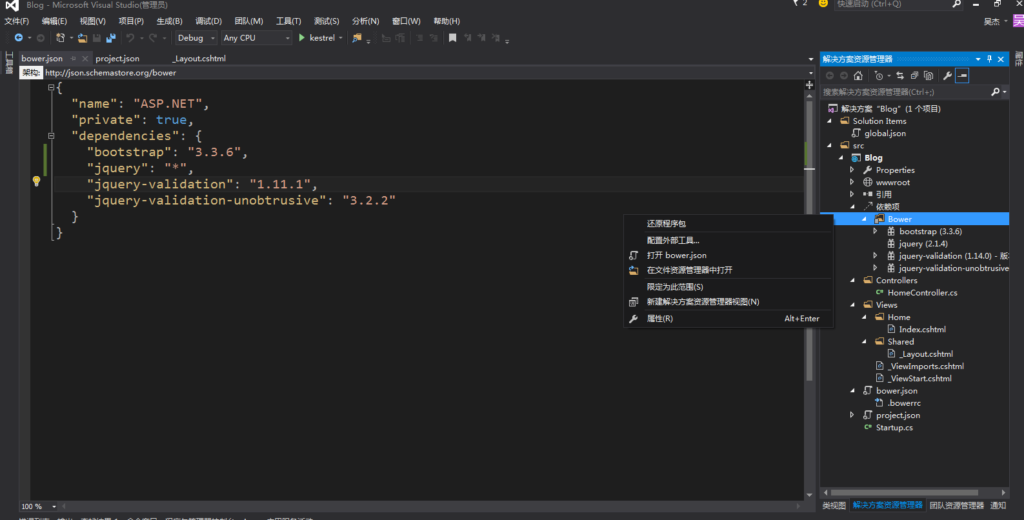
VS 2015使用bower管理前端包,很好很强大。
主要是配置bower.json,如下图:
php一个页面一个页面的写,页面逻辑全部高度自治,除了通用配置,做到业务上无依赖。
这几天没事把WEBQQ协议弄通了,起初是用Python写的,后来用C#重写了一遍。对接了xiaoi和sim聊天机器人实现智能聊天。
在ubuntu上安装dnx。
2024.11.25补充说明:本文所说的dnx,就是早期的.net core
先安装2个工具
sudo apt-get install unzip curl利用CURL下载并安装DNVM
curl -sSL https://raw.githubusercontent.com/aspnet/Home/dev/dnvminstall.sh | DNX_BRANCH=dev sh && source ~/.dnx/dnvm/dnvm.sh先安装DNX需要的依赖包
sudo apt-get install libunwind8 gettext libssl-dev libcurl4-openssl-dev zlib1g libicu-dev uuid-dev使用DNVM安装DNX
dnvm upgrade -r coreclr名词解释:
DNVM: dotnet version manager, 它是一组脚本, 用于启动指定版本的ASP.NET运行环境。还可以通过NuGet管理DNX(升级等)。
DNX: dotnet Excution Environment, DNX是ASP.NET程序的运行环境,用于启动并运行asp.net程序,
该环境包括编译系统, SDK工具集, Native CLR宿主环境,可以使用DNVM管理各种版本的DNX, 如dnvm list可以列出所有可用的DNX环境。
dnu: dotnet utility, 是一个命令行的包管理器, 包含在dnx内, 所以只要安装了dnx,就可以使用DNU命令,可以用于恢复程序包,安装程序包,部署程序包等。
最后,要装libuv
Libuv is a multi-platform asynchronous IO library that is used by Kestrel, a cross-platform HTTP server for hosting ASP.NET 5 web applications.
To build libuv you should do the following:
sudo apt-get install make automake libtool curl

curl -sSL https://github.com/libuv/libuv/archive/v1.4.2.tar.gz | sudo tar zxfv - -C /usr/local/src

cd /usr/local/src/libuv-1.4.2

sudo sh autogen.sh

sudo ./configure

sudo make

sudo make install

sudo rm -rf /usr/local/src/libuv-1.4.2 && cd ~/

sudo ldconfigUbuntu14.04里面有两个python版本。
默认的是python2.7
如果要使用python3.4 可以用python3这个命令就好了。
让PHP函数json_encode不转义中文
echo json_encode($ret, JSON_UNESCAPED_UNICODE);PHP7 编译配置参数
ubuntu14.04上需要安装的库
apt-get -y install libxml2-dev libjpeg-dev libpng-dev libfreetype6-dev libmcrypt-dev libcurl4-openssl-dev make gcc说明:configure 是用来生成makefle的
配合apache的编译参数
./configure --prefix=/www/php --with-apxs2=/www/httpd/bin/apxs --enable-cli --enable-shared --with-libxml-dir --with-gd --with-openssl --enable-mbstring --with-mcrypt --with-mysqli --enable-opcache --enable-mysqlnd --enable-zip --with-zlib-dir --with-pdo-mysql --with-jpeg-dir --with-freetype-dir --with-curl --with-pdo-sqlite --with-sqlite3 --disable-fileinfo配合nginx使用的编译参数
先要安装Pgsql的开发包 apt-get install postgresql-server-dev-9.5
-dev的包一般是用来提供依赖关系的。
./configure --prefix=/usr/local/php5 --with-gd --with-curl --enable-fpm --enable-cgi --with-openssl --enable-mbstring --with-mcrypt --with-pdo-mysql --enable-zip --with-mysqli --enable-opcache --enable-mysqlnd --with-libxml-dir --with-jpeg-dir --with-freetype-dir --with-pdo-sqlite --with-sqlite3 --disable-fileinfo --enable-cli --enable-shared 要使用PG的话就加上下面两个参数
--with-pdo-pgsql --with-pgsql=/usr/lib/postgresql注意:–with-pgsql=/usr/lib/postgresql的路径只在ubuntu14.04 64位上测试通过
make && make install最后把php加入环境变量
sudo echo "PATH=$PATH:/www/php/bin">> /etc/profile
echo "PATH=$PATH:/usr/local/php5/bin">> /etc/profile
最后把php.ini 拷贝到/www/php/lib下面
cp php.ini-development /usr/local/php5/lib/php.iniVC 递归调用GetWindow查找控件
HWND g_TargetMainWnd = NULL ;
BOOL WINAPI   EnumWindowsProc(HWND hWnd, LPARAM lParam)
{
        if (:: GetWindowLong(hWnd , GWL_STYLE ) & WS_VISIBLE )
       {
               char szWindowText[128] = { 0 };
               if (:: GetWindowText(hWnd , szWindowText, 128) != 0)
              {
                      if (strstr(szWindowText, "职业技能实训平台" ) != NULL )
                     {
                           g_TargetMainWnd = hWnd;
                            return FALSE;
                     }
              }

       }
        return TRUE;
}

void CAnswerGetDlg ::Work(HWND hSubWnd )
{
        if ( hSubWnd != NULL)
       {
               while ( hSubWnd != NULL)
              {
                      char szWindowText[128] = { 0 };
                     :: GetWindowText(hSubWnd , szWindowText, 128);
                      if (strstr(szWindowText, "[A]"))
                     {
                            RECT rc;
                            BOOL bret = ::GetWindowRect( hSubWnd, &rc);
                            SetDlgItemText(IDC_EDIT1 , szWindowText + 3);
                            char szCoordinate[16] = { 0 };
                           sprintf(szCoordinate, "%d %d", rc.left, rc.top);
                            SetDlgItemText(IDC_EDIT5 , szCoordinate);
                     }
                      if (strstr(szWindowText, "[B]"))
                     {
                            RECT rc;
                           ::GetWindowRect( hSubWnd, &rc);
                            SetDlgItemText(IDC_EDIT2 , szWindowText + 3);
                            char szCoordinate[16] = { 0 };
                           sprintf(szCoordinate, "%d %d", rc.left, rc.top);
                            SetDlgItemText(IDC_EDIT6 , szCoordinate);
                     }
                      if (strstr(szWindowText, "[C]"))
                     {
                            RECT rc;
                           ::GetWindowRect( hSubWnd, &rc);
                            SetDlgItemText(IDC_EDIT3 , szWindowText + 3);
                            char szCoordinate[16] = { 0 };
                           sprintf(szCoordinate, "%d %d", rc.left, rc.top);
                            SetDlgItemText(IDC_EDIT7 , szCoordinate);
                     }
                      if (strstr(szWindowText, "[D]"))
                     {
                            RECT rc;
                           ::GetWindowRect( hSubWnd, &rc);
                            SetDlgItemText(IDC_EDIT4 , szWindowText + 3);
                            char szCoordinate[16] = { 0 };
                           sprintf(szCoordinate, "%d %d", rc.left, rc.top);
                            SetDlgItemText(IDC_EDIT8 , szCoordinate);
                     }

                      HWND hSubWnd2 = ::GetWindow( hSubWnd, GW_CHILD);
                      if(hSubWnd2 != NULL)
                     {
                           Work(hSubWnd2);
                     }

                      hSubWnd = ::GetWindow( hSubWnd, GW_HWNDNEXT);
              }
       }
}


void CAnswerGetDlg ::OnBnClickedOk()
{
        for ( int i = 0; i < 8; i++)
       {
               SetDlgItemText(1000 + i, "" );
       }
       ::EnumWindows(( WNDENUMPROC)EnumWindowsProc, NULL );
        if (g_TargetMainWnd != NULL)
       {
               HWND hSubWnd = ::GetWindow(g_TargetMainWnd, GW_CHILD);
              Work(hSubWnd);
       }
}WinForm中richTextBox1换行
richTextBox1.Text += "【" + DateTime .Now.ToLongTimeString() + "】" + log;
this.richTextBox1.AppendText( Environment.NewLine);Linux查找并删除命令
find / -name "apache2" -print -exec rm -fr {} \;