dos命令,根据进程名结束进程
例如要结束 server.exe
taskkill /f /im server.exe /t在新窗口中重新启动应用
start server.exedos命令,根据进程名结束进程
例如要结束 server.exe
taskkill /f /im server.exe /t在新窗口中重新启动应用
start server.exeC# 获取程序编译时间
var compileTime = System.IO.File.GetLastWriteTime(System.Reflection.Assembly.GetEntryAssembly().Location);C#检查系统是否支持HttpListener
// 检查系统是否支持
if (!HttpListener.IsSupported)
{
    throw new System.InvalidOperationException("必须为 Windows XP SP2 或 Server 2003 以上系统!");
}C# 操作INI文件的类
using System;
using System.Collections.Generic;
using System.IO;
using System.Linq;
using System.Reflection;
using System.Runtime.InteropServices;
using System.Text;

namespace server
{
    class IniFile   // revision 11
    {
        string Path;
        string EXE = Assembly.GetExecutingAssembly().GetName().Name;

        [DllImport("kernel32", CharSet = CharSet.Unicode)]
        static extern long WritePrivateProfileString(string Section, string Key, string Value, string FilePath);

        [DllImport("kernel32", CharSet = CharSet.Unicode)]
        static extern int GetPrivateProfileString(string Section, string Key, string Default, StringBuilder RetVal, int Size, string FilePath);

        public IniFile(string IniPath = null)
        {
            Path = new FileInfo(IniPath ?? EXE + ".ini").FullName.ToString();
        }

        public string Read(string Key, string Section = null)
        {
            var RetVal = new StringBuilder(255);
            GetPrivateProfileString(Section ?? EXE, Key, "", RetVal, 255, Path);
            return RetVal.ToString();
        }

        public void Write(string Key, string Value, string Section = null)
        {
            WritePrivateProfileString(Section ?? EXE, Key, Value, Path);
        }

        public void DeleteKey(string Key, string Section = null)
        {
            Write(Key, null, Section ?? EXE);
        }

        public void DeleteSection(string Section = null)
        {
            Write(null, null, Section ?? EXE);
        }

        public bool KeyExists(string Key, string Section = null)
        {
            return Read(Key, Section).Length > 0;
        }
    }
}C# 格式化时间的格式,如下:
yyyy-MM-dd HH:mm:ss记忆方法:只有MH(马航)是大写,其它小写。
Qt quick Image 从文件中加载图片:
Image{
    width: parent.width
    height: parent.height
    source: "file:./images/home.png"
}
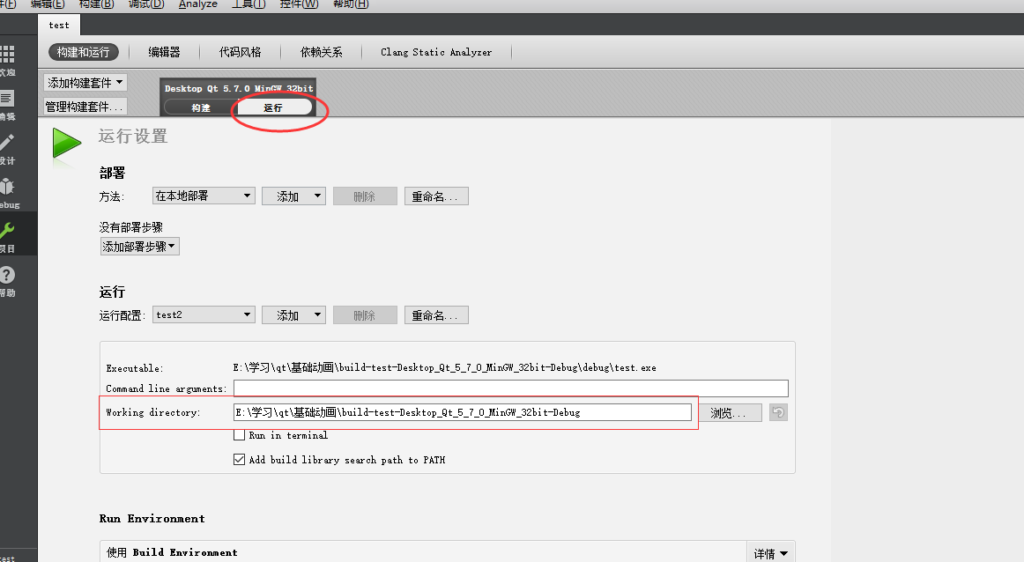
注意,当前目录是批Qt Creater中设置的工作目录
PDO execute()和exec()的区别如下:
exec() 执行一条sql语句,返回受影响的行数,此函数不返回结果集合。
execute()函数 用于执行已经预处理过的语句,返回结果只有成功或失败。预处理要使用prepare函数
使用execute()如果要获取受影响的行数,可以在调用execute()后 调用: $stmt->rowCount();来获取受影响的行数
php.ini 打开错误信息,修改如下配置:
display_errors=On
error_reporting = E_ALL | E_STRICT
如果使用apache,则要在httpd.conf最后添加
php_flag display_errors on
php_value error_reporting 2039
最后重启apache
反射实现 WPF 按钮的 PerformClick:
using System;
using System.Collections.Generic;
using System.Linq;
using System.Reflection;
using System.Text;
using System.Threading.Tasks;
using System.Windows.Controls.Primitives;
namespace cmbc
{
    static public class  ButtonEx
    {
        public static void PerformClick(this ButtonBase button)
        {
            var method = button.GetType().GetMethod("OnClick",
                BindingFlags.NonPublic | BindingFlags.Instance);
            if (method != null)
            {
                method.Invoke(button, null);
            }
            //button.Focus();
        }
    }
}Qt Quick 中最大化窗体:
import QtQuick 2.5
import QtQuick.Window 2.2

Window {
    visible: true
   // width: 640
   // height: 480

         visibility: "Maximized" // 全屏使用 FullScreen

    title: qsTr("民生银行触摸屏程序")

    MainForm {
        anchors.fill: parent
        mouseArea.onClicked: {
            Qt.quit();
        }

    }
}