.NET使用UDE.CSharp识别文件编码

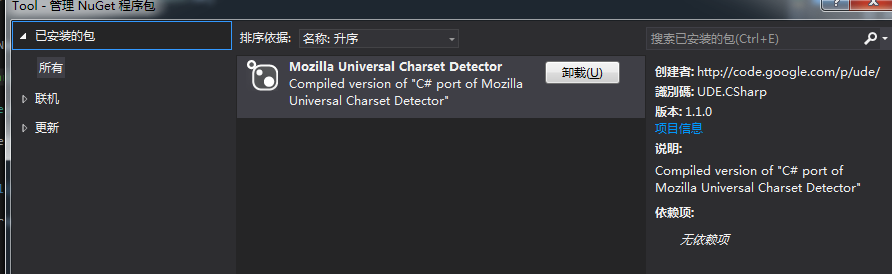
.NET中识别文件编码、识别字符集,有一个比较好用的包UDE.CSharp可以实现,这个包是Mozilla出品的,又叫Mozilla Universal Charset Detector。

首先在nuget下载安装UED:
使用样例如下:

private void btnImport_Click(object sender, EventArgs e)
{
    OpenFileDialog dlg = new OpenFileDialog();
    dlg.DefaultExt = ".txt";
    dlg.Filter = "txt文件|*.txt";
    if (dlg.ShowDialog() == System.Windows.Forms. DialogResult.OK)
    {
        _list.Clear();
        string filename = dlg.FileName;

        //使用Mozilla Universal Charset Detector侦测文件编码
        string charset = "UTF-8";
        using ( FileStream fs = File .OpenRead(filename))
        {
            Ude. CharsetDetector cdet = new Ude.CharsetDetector ();
            cdet.Feed(fs);
            cdet.DataEnd();
            if (cdet.Charset != null)
            {
                charset = cdet.Charset;
            }
        }

        string[] lines = File.ReadAllLines(filename, Encoding.GetEncoding(charset));

        foreach ( var line in lines)
        {
            //去重
            if (_list.IndexOf(line) == -1)
            {
                _list.Add(line);
            }
        }
    }
}
Dapper执行存储过程,获取Sequence

Dapper执行存储过程,获取Sequence

这里主要是DynamicParameters的使用

using (var conn = DbConfig .GetConnection())
{
    conn.Open();
    var p = new DynamicParameters();
    p.Add("@seq", dbType: DbType.Int32, direction: ParameterDirection.ReturnValue);
    conn.Execute("P_GetSeq", p, commandType: CommandType.StoredProcedure);
    Response.Write(p.Get< int>( "@seq"));
}

从WebBrowser控件中获取CookieContainer

从WebBrowser控件中获取CookieContainer

private CookieContainer _cookie = new CookieContainer();
private void GetCookie()
{
    if (webBrowser1.Document.Cookie != null)
    {
        string cookieStr = webBrowser1.Document.Cookie;
        string[] cookstr = cookieStr.Split( ';');
        foreach ( string str in cookstr)
        {
            string[] cookieNameValue = str.Split( '=');
            Cookie ck = new Cookie(cookieNameValue[0].Trim().ToString(), cookieNameValue[1].Trim().ToString());
            ck.Domain = ".qq.com";
            _cookie.Add(ck);
        }
    }
}

从CookieContainer中获取所有Cookie

从CookieContainer中获取所有Cookie:

/// <summary>
/// 把CookieContainer所有的Cookie读出来
/// </summary>
/// <param name="cc"></param>
/// <returns></returns>
private List <Cookie > GetAllCookies(CookieContainer cc)
{
    List<Cookie> lstCookies = new List< Cookie>();
    Hashtable table = ( Hashtable)cc.GetType().InvokeMember( "m_domainTable",
        System.Reflection. BindingFlags.NonPublic | System.Reflection.BindingFlags .GetField |
        System.Reflection. BindingFlags.Instance, null , cc, new object [] { });

    foreach (object pathList in table.Values)
    {
        SortedList lstCookieCol = (SortedList)pathList.GetType().InvokeMember("m_list" ,
            System.Reflection. BindingFlags.NonPublic | System.Reflection.BindingFlags .GetField
            | System.Reflection. BindingFlags.Instance, null , pathList, new object[] { });
        foreach ( CookieCollection colCookies in lstCookieCol.Values)
            foreach ( Cookie c in colCookies)
                lstCookies.Add(c);
    }

    return lstCookies;
}


///////////////////////////////////////////////////以下是使用样例代码:
private string GetSkey()
{
    string skey = string.Empty;

    GetCookie();
    List<Cookie> listCookie = GetAllCookies(_cookie);
    foreach (Cookie c in listCookie)
    {
        if (c.Name == "skey")
        {
            skey = c.Value;
            break;
        }
    }
    return skey;
}

lua的.NET实现: NeoLua

NeoLua 可以让你在 .NET 的应用中使用 Lua 语言或者反过来(当前支持的 Lua 版本是 5.2),其目的是遵循 C-Lua 实现并且合并完整的 .NET 框架支持。你可以很方便在 Lua 程序中调用 .NET 的 functions/classes/interfaces/events ,同时也可以轻松在 .NET 应用中调用 Lua 的变量和函数。

github: https://github.com/neolithos/neolua

codeplex: https://neolua.codeplex.com/

.NET采集用到的包

ScrapySharp + HtmlAgilityPack

这两个库基本可以完成98%的采集需求,剩下的2%可以再加一个库: phantomjs

目前接到的需求中,还没有使用到 phantomjs这个库。

补充(2015-3-9):

今天又发现了几个和采集网页相关的库(以下4个都没用过,先记下来)

  1. CsQuery。CsQuery可以算是.net中实现的Jquery, 可以使用类似Jquery中的方法来处理html页面。CsQuery的项目地址是https://github.com/afeiship/CsQuery
  2. AngleSharp (据说有内存泄漏,不知道现在还有没有)
  3. fizzler   fizzler是HtmlAgilityPack的一个扩展,支持jQuery Selector
  4. NSoup   NSoup是JSoup的Net移植版本。

ScrapySharp + HtmlAgilityPack 基本用法举例:

string htmlstr = HttpHelper.HttpPost(“http://www.tzgsj.gov.cn/baweb/show/shiju/queryByName.jsp” , “spellcondition=%E9%BE%99” );

HtmlDocument doc = new HtmlDocument ();

doc.LoadHtml(htmlstr);

HtmlNode docNode = doc.DocumentNode;

var nodes = docNode.CssSelect(“#content” );

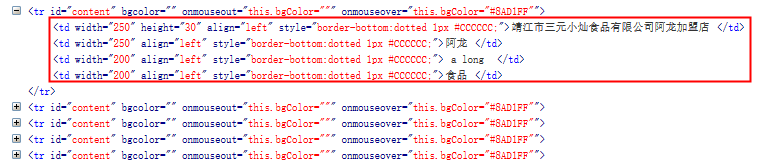
这样就拿到了所有ID为content的DOM元素。

这段HTML如下:

为了进一步拿到里面的td的文字,可以接着这样写:

foreach(var node in nodes)
{
    var tdNodes = node.CssSelect( "td");
    foreach(var td in tdNodes)
    {
        string text = td.InnerText;
    }
}

经过这个双重循环后,所有的td里的内容就都被采集出来了。

总结,ScrapySharp 主要是这个CssSelect好用。它是HtmlAgilityPack的一个扩展

.NET中的日期格式

在asp.net mvc的razor视图中本来想输出09/15这种日期格式,写的代码:@item.PostDate.ToString( "MM/dd")

但却发现生成的是 09-15这种。原来,.NET会自作聪明的以本机系统的时间格式来生成。

改为如下方式后输出正确:

@item.PostDate.ToString( "MM/dd", System.Globalization.DateTimeFormatInfo .InvariantInfo)
//System.Globalization.DateTimeFormatInfo.InvariantInfo 表示忽略系统时间格式,显示自定时间格式

另:也可以显示指定日期格式:

System.Globalization. DateTimeFormatInfo dtFormat = new System.Globalization.DateTimeFormatInfo ();
dtFormat.ShortDatePattern = "yyyy/MM/dd";
@item.PostDate.ToString("MM/dd", dtFormat)

关于.NET中 Control.Invoke

Control.Invoke含义是将方法委托给拥有该Control的线程去执行。

其实就是把Invoke里的内容委托给Control所在的线程去执行。如果是this.Invoke,就相当于Invoke里的内容是在主线主线程里运行的(这里默认this主窗口)

实例代码:

this.Invoke((EventHandler )delegate
{
    YzmForm yzm = new YzmForm();
    yzm.SetYzm(img);
    if (yzm.ShowDialog( this) == DialogResult.OK)
    {
        this._yzm = yzm.GetYzm();
    }
});

对于跨线程操作UI控件很好用,可以直接在子线程中把代码委托给主线程执行。

因为夸线程访问控件容易引起问题。所以推荐是谁创建谁调用原则。因为进度条是FORM的子控件,所以用THIS.INVOKE来委托主窗体去调用


补充:这种方式不能在窗体构造函数中使用,会报错:在创建窗口句柄之前,不能在控件上调用 Invoke 或 BeginInvoke。

可以用下面的方式:

public void InsertLog(string log)
{
    if (listBoxLog.InvokeRequired)
    {
        this.Invoke( new MethodInvoker(delegate ()
        {
            InsertLog(log);
        }));
    }
    else
    {
        string t = "【" + DateTime .Now.ToString("HH:mm:ss") + "】";
        listBoxLog.Items.Add(t + log);
    }    
}
