C#中根据Enum的值获取对应的名称
public enum OrderStateEnum
{
    未发货 = 1 ,
    已发货 = 2 ,
    交易成功 = 3
}
意思就是,根据1,2,3获取对应的key(如”未发货”)
代码如下:
this.txtState.Text = Enum.Parse(typeof(OrderStateEnum), "1", true).ToString();C#中根据Enum的值获取对应的名称
public enum OrderStateEnum
{
未发货 = 1 ,
已发货 = 2 ,
交易成功 = 3
}意思就是,根据1,2,3获取对应的key(如”未发货”)
代码如下:
this.txtState.Text = Enum.Parse(typeof(OrderStateEnum), "1", true).ToString();C#下载网页图片
static void Main(string [] args)
{
    string url1 = "http://my.oschina.net/js/ke/plugins/emoticons/{0}.gif" ;
    for(int i=0; i<135; i++)
    {
        string url = string.Format(url1, i);
        WebRequest request = WebRequest .Create(url);
        WebResponse response = request.GetResponse();
        Stream reader = response.GetResponseStream();
        FileStream writer = new FileStream (@"E:\临时测试\ConsoleApplication2\新建文件夹\" + i.ToString() + ".gif", FileMode.OpenOrCreate, FileAccess.Write);
        byte[] buff = new byte[512];
        int c = 0; //实际读取的字节数
        while ((c = reader.Read(buff, 0, buff.Length)) > 0)
        {
            writer.Write(buff, 0, c);
        }
        writer.Close();
        writer.Dispose();
        reader.Close();
        reader.Dispose();
        response.Close();
    }
    Console.WriteLine( "下载完成.." );
}原理就是从webbrowser拿到Cookie
一般做网页登录,比如登录QQ空间,则要破解登录的相关的一系列加密算法。
在给客户维护以前登录QQ空间采集好友访客的一个软件时,发现2015年的空间密码加密方式变了,由以前的MD5改为了RSA,找到了加密的JS文件,但懒的转为C#代码。本来想用Interop.MSScriptControl.dll在C#中调用JS,但是直接调用这个JS文件会报错。实在不想继续找下去,一直在想着有什么简单方便的方法。终于功夫不负有心人,还真让我找到了。
原来的方式是,是从UI界面上获取用户要登录的用户名和密码,C#代码经过系统的加密,转换为TX需要的格式,并发包的服务器,服务器反回一些cookie和一些有用的值(比如g_tk),然后后续的一些操作要带上这些cookie和g_tk。现在既然这些过程解不了密,那么是否可以用Webbrowser控件来登录,登录完成后从webbrowser中拿到cookie,后续的操作带上这些cooke即可。
经过动手尝试,证明是可行的。对于QQ空间的登录,过程是这样的:
webbrowser中进行登录,登录完成后,在恰当的时机,拿到webbrowser的cookie,然后在cookieContainer中找到skey
至此,所有cookie和skey都拿到了。然后还有一个重要的参数g_tk, 这个参数是根据skey计算出来的。算法如下:
/// <summary>
/// 获取空间登录的g_tk
/// </summary>
/// <param name="skey"></param>
/// <returns></returns>
public long g_tk(string skey)
{
        long hash = 5381;
        for ( int i = 0; i < skey.Length; i++)
       {
              hash += (hash << 5) + skey[i];
       }
        return hash & 0x7fffffff;
}
试了下,能用,还好,g_tk的算法没有改动。
这样,项目维护完成,600块钱到手。
下面附上webbrowser登录过程以及拿到cookie和相cookie中取skey的所有代码:
public partial class QZoneWebLogin : Form
{
    private bool flag = false;
    private string _skey = string.Empty;
    private CookieContainer _cookie = new CookieContainer();

    public string skey
    {
        get { return _skey; }
    }

    public CookieContainer cookie
    {
        get { return _cookie; }
    }

    public QZoneWebLogin()
    {
        InitializeComponent();
    }

    private void webBrowser1_DocumentCompleted( object sender, WebBrowserDocumentCompletedEventArgs e)
    {
        if (webBrowser1.Url.ToString().Contains( "http://user.qzone.qq.com/") && webBrowser1.Url.ToString().Contains("?ptsig=" ))
        {
            if (!flag)
            {
                flag = true;
                _skey = GetSkey();
                this.DialogResult = System.Windows.Forms. DialogResult.OK;
            }

        }

    }


    private string GetSkey()
    {
        string skey = string.Empty;

        GetCookie();
        List< Cookie> listCookie = GetAllCookies(_cookie);
        foreach ( Cookie c in listCookie)
        {
            if (c.Name == "skey")
            {
                skey = c.Value;
                break;
            }
        }
        return skey;
    }

    private void GetCookie()
    {
        if (webBrowser1.Document.Cookie != null)
        {
            string cookieStr = webBrowser1.Document.Cookie;
            string[] cookstr = cookieStr.Split( ';');
            foreach ( string str in cookstr)
            {
                string[] cookieNameValue = str.Split( '=');
                Cookie ck = new Cookie(cookieNameValue[0].Trim().ToString(), cookieNameValue[1].Trim().ToString());
                ck.Domain = ".qq.com";
                _cookie.Add(ck);
            }
        }
    }


    /// <summary>
    /// 把CookieContainer所有的Cookie读出来
    /// </summary>
    /// <param name="cc"></param>
    /// <returns></returns>
    private List<Cookie> GetAllCookies( CookieContainer cc)
    {
        List< Cookie> lstCookies = new List< Cookie>();
        Hashtable table = ( Hashtable)cc.GetType().InvokeMember( "m_domainTable",
            System.Reflection. BindingFlags.NonPublic | System.Reflection.BindingFlags .GetField |
            System.Reflection. BindingFlags.Instance, null , cc, new object [] { });

        foreach ( object pathList in table.Values)
        {
            SortedList lstCookieCol = (SortedList)pathList.GetType().InvokeMember("m_list" ,
                System.Reflection. BindingFlags.NonPublic | System.Reflection.BindingFlags .GetField
                | System.Reflection. BindingFlags.Instance, null , pathList, new object[] { });
            foreach ( CookieCollection colCookies in lstCookieCol.Values)
                foreach ( Cookie c in colCookies)
                    lstCookies.Add(c);
        }

        return lstCookies;
    }
}从WebBrowser控件中获取CookieContainer
private CookieContainer _cookie = new CookieContainer();
private void GetCookie()
{
    if (webBrowser1.Document.Cookie != null)
    {
        string cookieStr = webBrowser1.Document.Cookie;
        string[] cookstr = cookieStr.Split( ';');
        foreach ( string str in cookstr)
        {
            string[] cookieNameValue = str.Split( '=');
            Cookie ck = new Cookie(cookieNameValue[0].Trim().ToString(), cookieNameValue[1].Trim().ToString());
            ck.Domain = ".qq.com";
            _cookie.Add(ck);
        }
    }
}从CookieContainer中获取所有Cookie:
/// <summary>
/// 把CookieContainer所有的Cookie读出来
/// </summary>
/// <param name="cc"></param>
/// <returns></returns>
private List <Cookie > GetAllCookies(CookieContainer cc)
{
    List<Cookie> lstCookies = new List< Cookie>();
    Hashtable table = ( Hashtable)cc.GetType().InvokeMember( "m_domainTable",
        System.Reflection. BindingFlags.NonPublic | System.Reflection.BindingFlags .GetField |
        System.Reflection. BindingFlags.Instance, null , cc, new object [] { });

    foreach (object pathList in table.Values)
    {
        SortedList lstCookieCol = (SortedList)pathList.GetType().InvokeMember("m_list" ,
            System.Reflection. BindingFlags.NonPublic | System.Reflection.BindingFlags .GetField
            | System.Reflection. BindingFlags.Instance, null , pathList, new object[] { });
        foreach ( CookieCollection colCookies in lstCookieCol.Values)
            foreach ( Cookie c in colCookies)
                lstCookies.Add(c);
    }

    return lstCookies;
}


///////////////////////////////////////////////////以下是使用样例代码:
private string GetSkey()
{
    string skey = string.Empty;

    GetCookie();
    List<Cookie> listCookie = GetAllCookies(_cookie);
    foreach (Cookie c in listCookie)
    {
        if (c.Name == "skey")
        {
            skey = c.Value;
            break;
        }
    }
    return skey;
}
C#使用NPOI导出Excel
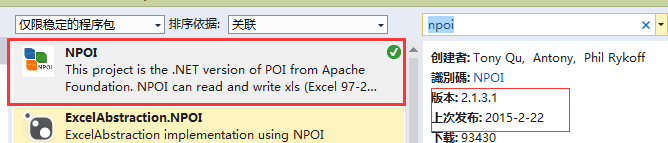
使用代码如下:
using System.Data;
using System.Configuration;
using System.Web;
using System.Web.Security;
using System.Web.UI;
using System.Web.UI.HtmlControls;
using System.Web.UI.WebControls;
using System.Web.UI.WebControls.WebParts;
using System.IO;
using System.Text;

using NPOI.HSSF.UserModel;
using NPOI.HPSF;
using NPOI.POIFS.FileSystem;
using NPOI.SS.UserModel;

namespace Common
{
    public class NPOIHelper
    {
        public void Export(System.Windows.Forms. ListView listView, string fileName)
        {
            var hssfworkbook = new HSSFWorkbook();
            ////create a entry of DocumentSummaryInformation
            DocumentSummaryInformation dsi = PropertySetFactory.CreateDocumentSummaryInformation();
            dsi.Company = "NPOI Team";
            hssfworkbook.DocumentSummaryInformation = dsi;

            ////create a entry of SummaryInformation
            SummaryInformation si = PropertySetFactory .CreateSummaryInformation();
            si.Subject = "NPOI SDK Example";
            hssfworkbook.SummaryInformation = si;


            //调整列宽
            var sheet1 = hssfworkbook.CreateSheet( "Sheet1");
            sheet1.SetColumnWidth(0, 10000);
            sheet1.SetColumnWidth(1, 10000);
            sheet1.SetColumnWidth(2, 10000);
            sheet1.SetColumnWidth(3, 10000);

            //表头
            var row0 = sheet1.CreateRow(0);
            row0.CreateCell(0).SetCellValue( "企业名称" );
            row0.CreateCell(1).SetCellValue( "中文字号" );
            row0.CreateCell(2).SetCellValue( "中文拼音" );
            row0.CreateCell(3).SetCellValue( "行业特征" );

            for( int i=0; i<listView.Items.Count; i++)
            {
                string a = listView.Items[i].SubItems[0].Text;
                string b = listView.Items[i].SubItems[1].Text;
                string c = listView.Items[i].SubItems[2].Text;
                string d = listView.Items[i].SubItems[3].Text;
                var row = sheet1.CreateRow(i+1); //如果不使用表头,这里就不用+1了
                row.CreateCell(0).SetCellValue(a);
                row.CreateCell(1).SetCellValue(b);
                row.CreateCell(2).SetCellValue(c);
                row.CreateCell(3).SetCellValue(d);
            }


            //Write the stream data of workbook to the root directory
            //MemoryStream file = new MemoryStream();
           // hssfworkbook.Write(file);

            //写入文件
            FileStream file = new FileStream (fileName, FileMode.Create);
            hssfworkbook.Write(file);
            file.Close();


        }
    }
}
调用:
注意先using Common;
/*保存对话框*/
SaveFileDialog saveFileDialog = new SaveFileDialog ();
saveFileDialog.Filter = "导出Excel(*.xls)|*.xls";

if (saveFileDialog.ShowDialog() == DialogResult.OK)
{
    NPOIHelper npoi = new NPOIHelper();
    npoi.Export(this.listView1, saveFileDialog.FileName);
    MessageBox.Show( "导出完成!" );

}C# Http GET 和POST HttpClient HttpHelper
using System;
using System.Collections.Generic;
using System.IO;
using System.Linq;
using System.Net;
using System.Text;
using System.Threading.Tasks;
namespace alimama
{
    class HttpHelper
    {
        private static CookieContainer cookieContainer = new CookieContainer();
        private static int _timeOut = 1000 * 30; // 30秒超时  默认值是 100,000 毫秒(100 秒)
        static public string HttpGet(string url, string referer = "")
        {
            HttpWebRequest httpWebRequest = null;
            HttpWebResponse httpWebResponse = null;
            httpWebRequest = (HttpWebRequest)HttpWebRequest.Create(url);
            httpWebRequest.CookieContainer = cookieContainer;
            httpWebRequest.Method = "GET";
            httpWebRequest.ServicePoint.ConnectionLimit = int.MaxValue;
            if (!string.IsNullOrEmpty(referer))
            {
                httpWebRequest.Referer = referer;
            }
            //httpWebRequest.Host = Host;
            httpWebRequest.UserAgent = "Mozilla/5.0 (Windows NT 6.1) AppleWebKit/537.36 (KHTML, like Gecko) Chrome/31.0.1650.63 Safari/537.36";
            httpWebRequest.KeepAlive = true;
            httpWebRequest.Accept = "text/html,application/xhtml+xml,application/xml;q=0.9,*/*;q=0.8";
            httpWebRequest.ServicePoint.Expect100Continue = false;
            httpWebRequest.Timeout = _timeOut; //默认值是 100,000 毫秒(100 秒)
            httpWebResponse = (HttpWebResponse)httpWebRequest.GetResponse();
            Stream responseStream = httpWebResponse.GetResponseStream();
            StreamReader streamReader = new StreamReader(responseStream, Encoding.UTF8);
            string html = streamReader.ReadToEnd();
            streamReader.Close();
            responseStream.Close();
            httpWebRequest.Abort();
            httpWebResponse.Close();
            return html;
        }
        static public string HttpPost(string url, string postData, string referer = "")
        {
            HttpWebRequest httpWebRequest = null;
            HttpWebResponse httpWebResponse = null;
            httpWebRequest = (HttpWebRequest)HttpWebRequest.Create(url);
            httpWebRequest.CookieContainer = cookieContainer;
            httpWebRequest.Method = "POST";
            httpWebRequest.ServicePoint.ConnectionLimit = int.MaxValue;
            if (!string.IsNullOrEmpty(referer))
            {
                httpWebRequest.Referer = referer;
            }
            //httpWebRequest.Host = Host;
            httpWebRequest.UserAgent = "Mozilla/5.0 (Windows NT 6.1) AppleWebKit/537.36 (KHTML, like Gecko) Chrome/31.0.1650.63 Safari/537.36";
            httpWebRequest.KeepAlive = true;
            httpWebRequest.ContentType = "application/x-www-form-urlencoded; charset=UTF-8";
            httpWebRequest.ServicePoint.Expect100Continue = false;
            httpWebRequest.Timeout = _timeOut; //默认值是 100,000 毫秒(100 秒)
            byte[] byteArray = Encoding.UTF8.GetBytes(postData); //转化
            httpWebRequest.ContentLength = byteArray.Length;
            Stream newStream = httpWebRequest.GetRequestStream();
            newStream.Write(byteArray, 0, byteArray.Length); //写入参数
            newStream.Close();
            httpWebResponse = (HttpWebResponse)httpWebRequest.GetResponse();
            Stream responseStream = httpWebResponse.GetResponseStream();
            StreamReader streamReader = new StreamReader(responseStream, Encoding.UTF8);
            string html = streamReader.ReadToEnd();
            streamReader.Close();
            responseStream.Close();
            httpWebRequest.Abort();
            httpWebResponse.Close();
            return html;
        }
        static public void Download(string url, string savePath)
        {
            HttpWebRequest request = (HttpWebRequest)WebRequest.Create(url);
            request.CookieContainer = cookieContainer;
            WebResponse response = request.GetResponse();
            Stream reader = response.GetResponseStream();
            FileStream writer = new FileStream(savePath, FileMode.OpenOrCreate, FileAccess.Write);
            byte[] buff = new byte[512];
            int c = 0; //实际读取的字节数
            while ((c = reader.Read(buff, 0, buff.Length)) > 0)
            {
                writer.Write(buff, 0, c);
            }
            writer.Close();
            writer.Dispose();
            reader.Close();
            reader.Dispose();
            response.Close();
        }
    }
}C#中,让线程挂起。不能使用Thead.Suspend(), 这个函数在.NET中已经被否决了,具体原因没有深入研究。微软推荐使用System.Threading中的函数,比如Monitor, Mutex, Event等。
在QQ好友空间访客提取的项目中我使用了ManualResetEvent这个Event类,具体用法如下:
类字段定义:
private ManualResetEvent _event = new ManualResetEvent (true ); //线程事件
private bool _pause = false; //线程是否暂停
工作线程函数中:
if (_pause)
{
     SetStatus( "已暂停");
}
_event.WaitOne();
暂停函数中:
SetStatus("暂停中...");
_event.Reset();
_pause = true;
恢复函数中:
if (_pause)
{
     //to resume thread
     _event.Set();
     _pause = false;

     return;
}c#连接access 时出现:未在本地计算机上注册 Microsoft.Jet.OLEDB.4.0 的错误
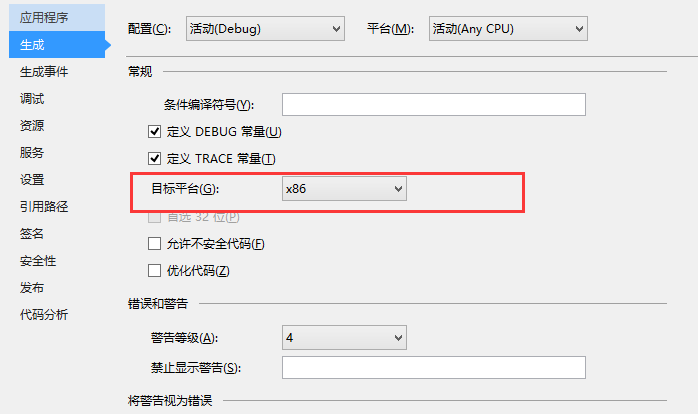
解决方案:
在VS项目属性中,生成页, 把“目标平台”改为X86即可,如下图所示:
C#合并数组
public string[] MergerArray(string[] First, string[] Second)
{
    string[] result = new string[First.Length + Second.Length];
    First.CopyTo(result, 0);
    Second.CopyTo(result, First.Length);
    return result;
}
泛型版本
public T[] MergerArray<T>(T[] First,T[] Second)
{
    T[] result =new T[First.Length + Second.Length];
    First.CopyTo(result, 0);
    Second.CopyTo(result, First.Length);
    return result;
}
合并多个数组
/// <summary>
/// 连接多个数组
/// </summary>
/// <typeparam name="T">数组数据类型</typeparam>
/// <param name="source">源数组</param>
/// <param name="arrays">被连接的多个数组</param>
/// <returns></returns>
public static T[] Concat<T>(this T[] source, params T[][] arrays)
{
    if (source == null)
    {
        throw new ArgumentNullException("source");
    }


    var length = source.Length + arrays.Sum(array => array != null ? array.Length : 0);
    var result = new T[length];
    length = source.Length;
    Array.Copy(source, 0, result, 0, source.Length);
    foreach (var array in arrays)
    {
        if (array != null)
        {
            Array.Copy(array, 0, result, length, array.Length);
            length += array.Length;
        }
    }
    return result;
}