遇到 .NET Winform 报错,错误信息如下:
Description: The process was terminated due to an unhandled exception.
Exception Info: System.IO.FileNotFoundException
可能是因为没有把需要的DLL程序集和EXE放到一起引起的。
遇到 .NET Winform 报错,错误信息如下:
Description: The process was terminated due to an unhandled exception.
Exception Info: System.IO.FileNotFoundException
可能是因为没有把需要的DLL程序集和EXE放到一起引起的。
php fopen打开中文名的文件 :
注意要使用iconv将iconv转码为GBK,当前PHP文档是uft-8编码的。
$file_dir = dirname(__FILE__) . '\\';
$name = iconv ( 'UTF-8', 'GBK', '金科智能VR批量渲染加速系统免费版.rar' );  //从UFT8编码转到GBK编码

$file = fopen($file_dir.$name,"rb");centos编译安装apache2.4.10 + PHP5.5全记录:
编译安装apache2.4.10
从官方下载(链接需要改版本):
wget http://mirror.bit.edu.cn/apache/httpd/httpd-2.4.39.tar.gz
wget http://mirror.bit.edu.cn/apache/apr/apr-1.7.0.tar.gz
wget http://mirror.bit.edu.cn/apache/apr/apr-util-1.6.1.tar.gz
解压缩:
tar -xvf httpd-2.4.39.tar.gz
tar -xvf apr-1.7.0.tar.gz
tar -xvf apr-util-1.6.1.tar.gz
一点文件操作:
mv apr-1.7.0 httpd-2.4.39/srclib/apr
mv apr-util-1.6.1 httpd-2.4.39/srclib/apr-util
cd httpd-2.4.39
编译前安装 :
yum install zlib-devel pcre-devel编译命令:
./configure --prefix=/web/httpd --with-included-apr --enable-nonportable-atomics=yes --with-z编译完成后:
make
make install
———————————-
wget http://cn2.php.net/distributions/php-5.5.18.tar.bz2
tar -xvf php-5.5.18.tar.bz2
cd php-5.5.18
./configure --prefix=/web/php --with-apxs2=/web/httpd/bin/apxs --enable-cli --enable-shared --with-libxml-dir --with-gd --with-openssl --enable-mbstring --with-mcrypt --with-mysqli --with-mysql --enable-opcache --enable-mysqlnd --enable-zip --with-zlib-dir --with-pdo-mysql --with-jpeg-dir --with-freetype-dir --with-curl --without-pdo-sqlite --without-sqlite31G以及1G以下的小内存主机编译PHP时报错,错误信息如下:
make: *** [ext/fileinfo/libmagic/apprentice.lo] Error 1
解决办法:在编译条件上加上 --disable-fileinfo 即可。
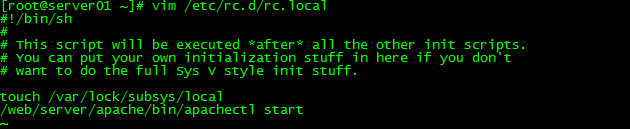
想让centos开机自动启动httpd,需要把启动程序的命令添加到/etc/rc.d/rc.local文件中,如下图:
centos查看cpu是32位的还是64位,用这个命令:
getconf LONG_BITCInternetSession 的头文件 :
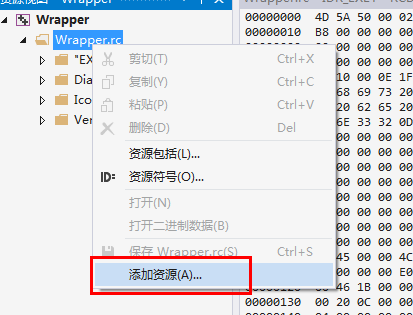
#include <afxinet.h>VS2013添加自定义资源,在资源视图上点击右键,添加资源。
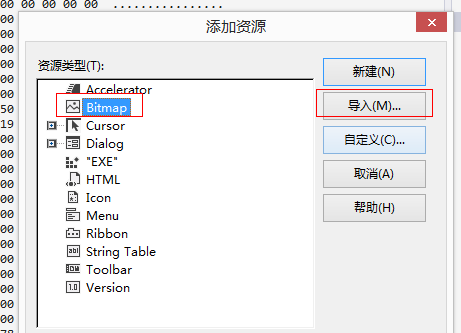
随便选一个,比如bitmap类型,并点击导入。
在打开的选择文件窗口选择“所有文件类型”
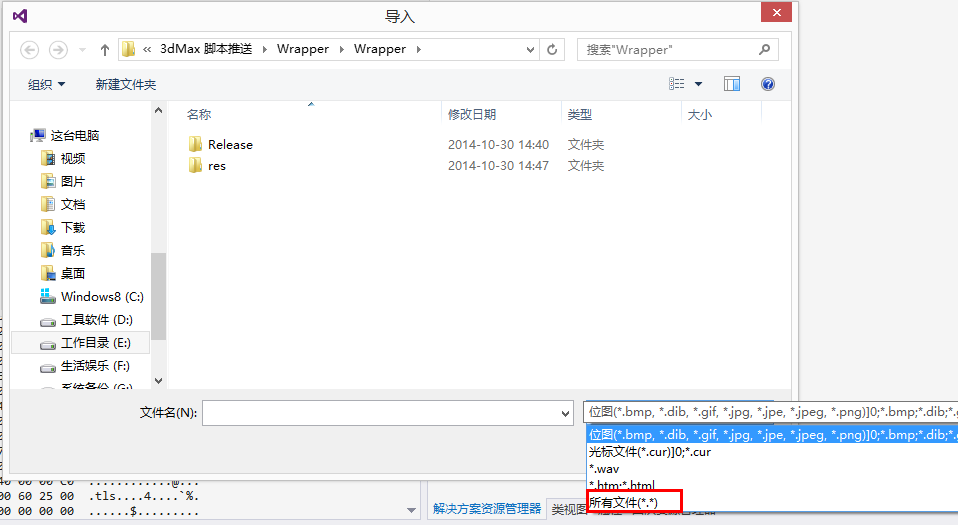
选择我们要导入的文件,并确定。
这时会弹出一个圣诞框,要求输入自定义类型名。输入名称后,自定义文件便被导入进来。
今晚把ubuntu12.04升级到了14.04,重启后发现ubuntu引导不了,于是进入windows8.1,使用EasyBCD修复了ubuntu的引导。结果由于误操作,把两个引导选项全部弄成了ubuntu,所以,只能进ubuntu了,win8.1进不了了。
下面说一下解决办法:
问题解决。这里没有尝试PE系统是否可以支持USB的U盘。所以直接在ubuntu中把NTBOOTautofix_2.5.7放进去了。这是个好工具。
WIN32获取公网IP的代码:
Utility.h
#pragma once
class CUtility
{
public:
       CUtility();
       ~CUtility();

public:
        DWORD HttpGet( LPCTSTR lpszFullUrl, char *pBuffer, int iBufferSize);
        void GetPublicIp( TCHAR *pIP, int len);
};
Utility.cpp
#include "stdafx.h"
#include "Utility.h"
#include "Transcode.h"
#include<wininet.h>
#pragma comment (lib ,"wininet.lib" )


CUtility::CUtility()
{
}


CUtility::~CUtility()
{
}

void CUtility ::GetPublicIp(TCHAR *pIP, int len)
{
        char szBuffer[1024];
       memset(szBuffer, 0, sizeof( char) * 1024);
       HttpGet( _TEXT( "http://city.ip138.com/ip2city.asp" ), szBuffer, 1024);

        char* begin = strstr(szBuffer, "[")+1;
        char* end = strstr(begin, "]");
        int offset = end - begin;
       begin[offset] = '\0';
        char *ip = begin;

       std:: wstring wip;
        Transcode::ANSI_to_Unicode(ip, offset, wip);

       wcsncpy_s( pIP, len, wip.c_str(), offset);
}

DWORD CUtility ::HttpGet(LPCTSTR lpszFullUrl, char *pBuffer, int iBufferSize)
{
        if ( lpszFullUrl == NULL )
               return 0;

        HINTERNET hNet = :: InternetOpen(_TEXT ("Mozilla/5.0 (Windows NT 6.3; WOW64; rv:33.0) Gecko/20100101 Firefox/33.0"),
               PRE_CONFIG_INTERNET_ACCESS,
               NULL,
               INTERNET_INVALID_PORT_NUMBER,
              0);
        if (hNet == NULL)
       {
               //TRACE(_T("error: InternetOpen发生异常. 错误代号: %s; 文件: %s; 行: %d/n"), ::GetLastError(), __FILE__, __LINE__);
               return 0;
       }

        HINTERNET hUrlFile = :: InternetOpenUrl(hNet,
               lpszFullUrl,
               NULL,
              0,
               INTERNET_FLAG_RELOAD,
              0);

        if (!hUrlFile)
       {
               //TRACE(_T("error:InternetOpenUrl发生异常. 错误代号: %s; 您可能需要添加\"Http://\" 或 \"Ftp://\" 文件: %s; 行: %d/n"), ::GetLastError(), __FILE__, __LINE__);
               return 0;
       }

       ::memset( pBuffer, 0, iBufferSize);
        DWORD dwBytesRead = 0;
        char szTemp[1024] = { 0 };
        DWORD dwTotalReadBytes = 0;
        while (InternetReadFile(hUrlFile, szTemp, sizeof(szTemp) - 1, &dwBytesRead))
       {
               if (0 == dwBytesRead)
                      break;
              szTemp[dwBytesRead] = 0; //此处非常重要,缺了这一句可能抓的内容就不正确

               // 缓冲区大小不够时,停止向目的缓冲区复制数据,跳出
               if (dwTotalReadBytes + dwBytesRead >= ( UINT) iBufferSize)
              {
                      pBuffer[ iBufferSize - 1] = 0;
                      break;
              }

              strcat_s( pBuffer, 1024, szTemp);
               ZeroMemory(szTemp, sizeof (szTemp));

              dwTotalReadBytes += dwBytesRead;

       }

       ::InternetCloseHandle(hUrlFile);
       ::InternetCloseHandle(hNet);
        return dwTotalReadBytes;
}