php empty的坑:
empty函数对于参数0也认为是TRUE
比如:
$a=0;
那么 empty($a) 为真。
真的坑。。
php empty的坑:
empty函数对于参数0也认为是TRUE
比如:
$a=0;
那么 empty($a) 为真。
真的坑。。
IronPython操作数据库
# -*- coding: utf-8 -*-
import clr
clr.AddReference('System.Data' )
from System .Data import *

conn = SqlClient.SqlConnection("server=42.96.190.81,2433;database=QQRobot;uid=sa;pwd=xinyang0822_xin;pooling=true;Enlist=true;connection lifetime=300;min pool size = 0;max pool size=512;packet size=1000")
conn.Open()

cmd = SqlClient.SqlCommand("select * from AIData where Id=1", conn)
reader = cmd.ExecuteReader(CommandBehavior.CloseConnection)

while reader.Read():
    print reader[0]

reader.Close()
conn.Close()System.Web.HttpUtility.UrlEncode都是对参数进行编码,要像下面这样写:
string data = string.Format(@"{{""ptwebqq"":""{0}"",""clientid"":{1},""psessionid"":""{2}"",""status"":""online""}}", _PTWebQQ, ClientID, PSessionID);
data = "r=" + Uri.EscapeDataString(data);
而不要把r=也编码进去!!!
血的教训,一晚上加一上午都浪费在这上面了!!!!
而python的urllib.parse.urlencode传入的是字典,所以避免了这个坑。
Razor视图文件中判断是Debug模式还是Release模式
@if (!HttpContext.Current.IsDebuggingEnabled)
{
}HttpContext.Current.IsDebuggingEnabled的值取决于web.config中的
<compilation debug="true" targetFramework =" 4.5" />.NET中识别文件编码、识别字符集,有一个比较好用的包UDE.CSharp可以实现,这个包是Mozilla出品的,又叫Mozilla Universal Charset Detector。
首先在nuget下载安装UED:
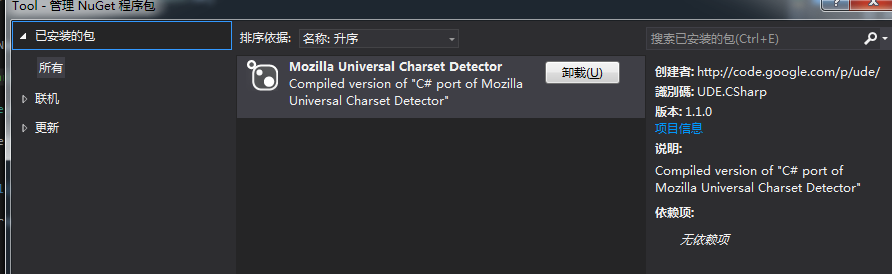

使用样例如下:
private void btnImport_Click(object sender, EventArgs e)
{
    OpenFileDialog dlg = new OpenFileDialog();
    dlg.DefaultExt = ".txt";
    dlg.Filter = "txt文件|*.txt";
    if (dlg.ShowDialog() == System.Windows.Forms. DialogResult.OK)
    {
        _list.Clear();
        string filename = dlg.FileName;

        //使用Mozilla Universal Charset Detector侦测文件编码
        string charset = "UTF-8";
        using ( FileStream fs = File .OpenRead(filename))
        {
            Ude. CharsetDetector cdet = new Ude.CharsetDetector ();
            cdet.Feed(fs);
            cdet.DataEnd();
            if (cdet.Charset != null)
            {
                charset = cdet.Charset;
            }
        }

        string[] lines = File.ReadAllLines(filename, Encoding.GetEncoding(charset));

        foreach ( var line in lines)
        {
            //去重
            if (_list.IndexOf(line) == -1)
            {
                _list.Add(line);
            }
        }
    }
}Dapper执行存储过程,获取Sequence
这里主要是DynamicParameters的使用
using (var conn = DbConfig .GetConnection())
{
    conn.Open();
    var p = new DynamicParameters();
    p.Add("@seq", dbType: DbType.Int32, direction: ParameterDirection.ReturnValue);
    conn.Execute("P_GetSeq", p, commandType: CommandType.StoredProcedure);
    Response.Write(p.Get< int>( "@seq"));
}最近 SAE 在未实名认证的应用上会有一提示:该页面的提供者尚未完成’,’实名认证’,’您的访问可能存在风险。
提示就提示吧,只是每次挡住后台的菜单比较麻烦。
于是果断 F12 看了一下,原来SAE是在标签的结尾加了一段 JS ,用 JS 来生成提示代码。
好吧,找到 typecho 的 footer.php 文件,在最后加一个<!-- 然后保存上传,刷新页面后,提示消失了。
前台的 footer.php 在 usr/themes/default 目录下。
后台的 footer.php 在 admin 目录下。
对于后台,我是直接在文件最后 使用echo输出 一个<!--
<?php if(!defined('__TYPECHO_ADMIN__')) exit; ?>
    </body>
</html>
<?php
/** 注册一个结束插件 */
Typecho_Plugin::factory('admin/footer.php')->end();

echo '<!--';
搞定!
Typecho在新浪SAE上开启Rewrite:
打开 SAE 应用上的 config.yaml
#cron:
# - description: cron test
# url: index.php
# schedule: every 43 mins
# timezone: Beijing
handle:
- rewrite: if(!is_dir() && !is_file()) goto "index.php?%{QUERY_STRING}"
使用 SVN 上传到 SAE ,然后在 typecho 后台 “设置”=>“永久链接”=>“启用地址重写功能”,提示失败时,直接勾选略并继续就行了。
失败是由于创建 .htaccess 文件失败,但在 SAE 上是使用的是config.yaml 来配置 URL 重写的,因为我们上面已经手动配置好了config.yaml,所以这里不用管它,可以直接忽略。
现在越来越喜欢 typecho 这个程序了,简洁不简单,各种情况都考虑到了。
2024.11.25补充:博客程序就选wordpress,生态很重要。
ASP.NET MVC 输出ModelState中的所有错误信息:
StringBuilder sb = new StringBuilder ();
var Keys = ModelState.Keys.ToList();
foreach (var key in Keys)
{
    var errors = ModelState[key].Errors.ToList();
    //将错误描述添加到sb中
    foreach (var error in errors)
    {
        sb.AppendLine(error.ErrorMessage);
    }

}

ViewBag.err = sb.ToString();centos安装mono:
添加源
rpm --import "http://keyserver.ubuntu.com/pks/lookup?op=get&search=0x3FA7E0328081BFF6A14DA29AA6A19B38D3D831EF"
yum-config-manager --add-repo http://download.mono-project.com/repo/centos/
安装 mono
yum install mono安装jexus
jexus curl jexus.org/5.6.x/install | sh