Ubuntu编译安装PHP5.6 报错:Cannot find OpenSSL’s
解决办法:
sudo apt-get install libcurl4-openssl-dev pkg-configapt-get install libssl-dev libsslcommon2-devUbuntu编译安装PHP5.6 报错:Cannot find OpenSSL’s
解决办法:
sudo apt-get install libcurl4-openssl-dev pkg-configapt-get install libssl-dev libsslcommon2-dev安卓webview出现 android webview webpage not available
解决办法:
加上 INTERNET 权限即可。
在用VS调试网页时,用videojs播放视频有时出现:a network error caused the media download to fail part-way
解决办法:不要用VS自带的IIS Express,换成系统自带的IIS就行了。
Windows使用命令行开启允许sql server远程连接:
EXEC sys.sp_configure N'remote access', N'1'
GO
RECONFIGURE WITH OVERRIDE
GOdos命令,根据进程名结束进程
例如要结束 server.exe
taskkill /f /im server.exe /t在新窗口中重新启动应用
start server.exeC# 获取程序编译时间
var compileTime = System.IO.File.GetLastWriteTime(System.Reflection.Assembly.GetEntryAssembly().Location);C#检查系统是否支持HttpListener
// 检查系统是否支持
if (!HttpListener.IsSupported)
{
    throw new System.InvalidOperationException("必须为 Windows XP SP2 或 Server 2003 以上系统!");
}C# 操作INI文件的类
using System;
using System.Collections.Generic;
using System.IO;
using System.Linq;
using System.Reflection;
using System.Runtime.InteropServices;
using System.Text;

namespace server
{
    class IniFile   // revision 11
    {
        string Path;
        string EXE = Assembly.GetExecutingAssembly().GetName().Name;

        [DllImport("kernel32", CharSet = CharSet.Unicode)]
        static extern long WritePrivateProfileString(string Section, string Key, string Value, string FilePath);

        [DllImport("kernel32", CharSet = CharSet.Unicode)]
        static extern int GetPrivateProfileString(string Section, string Key, string Default, StringBuilder RetVal, int Size, string FilePath);

        public IniFile(string IniPath = null)
        {
            Path = new FileInfo(IniPath ?? EXE + ".ini").FullName.ToString();
        }

        public string Read(string Key, string Section = null)
        {
            var RetVal = new StringBuilder(255);
            GetPrivateProfileString(Section ?? EXE, Key, "", RetVal, 255, Path);
            return RetVal.ToString();
        }

        public void Write(string Key, string Value, string Section = null)
        {
            WritePrivateProfileString(Section ?? EXE, Key, Value, Path);
        }

        public void DeleteKey(string Key, string Section = null)
        {
            Write(Key, null, Section ?? EXE);
        }

        public void DeleteSection(string Section = null)
        {
            Write(null, null, Section ?? EXE);
        }

        public bool KeyExists(string Key, string Section = null)
        {
            return Read(Key, Section).Length > 0;
        }
    }
}C# 格式化时间的格式,如下:
yyyy-MM-dd HH:mm:ss记忆方法:只有MH(马航)是大写,其它小写。
Qt quick Image 从文件中加载图片:
Image{
    width: parent.width
    height: parent.height
    source: "file:./images/home.png"
}
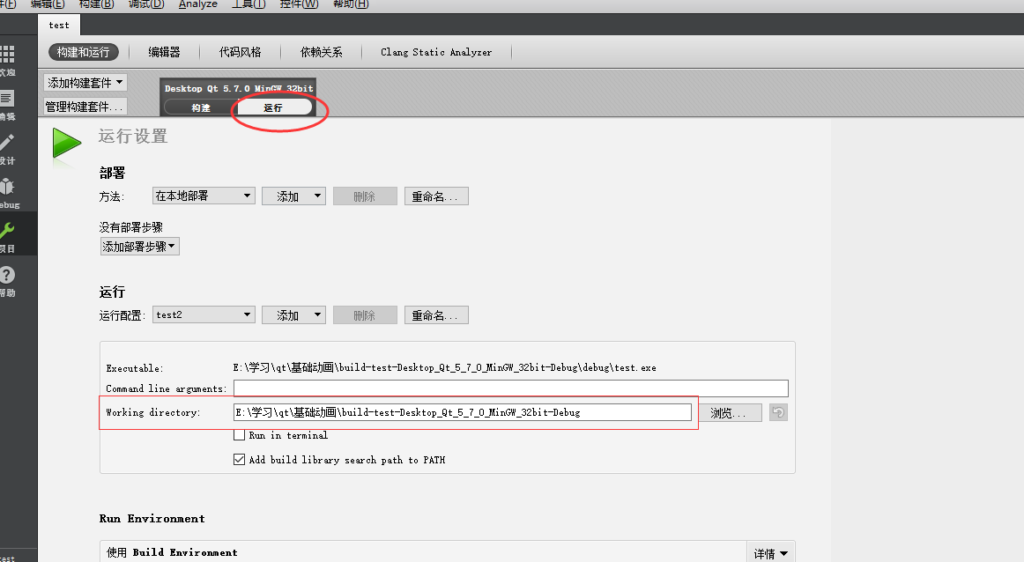
注意,当前目录是批Qt Creater中设置的工作目录