Laravel多语言支持

如果要支持多语言i18n,可以使用laravel-lang这个包,操作如下:

php artisan lang:publish 
composer require laravel-lang/common
php artisan lang:update
php artisan lang:add zh_CN

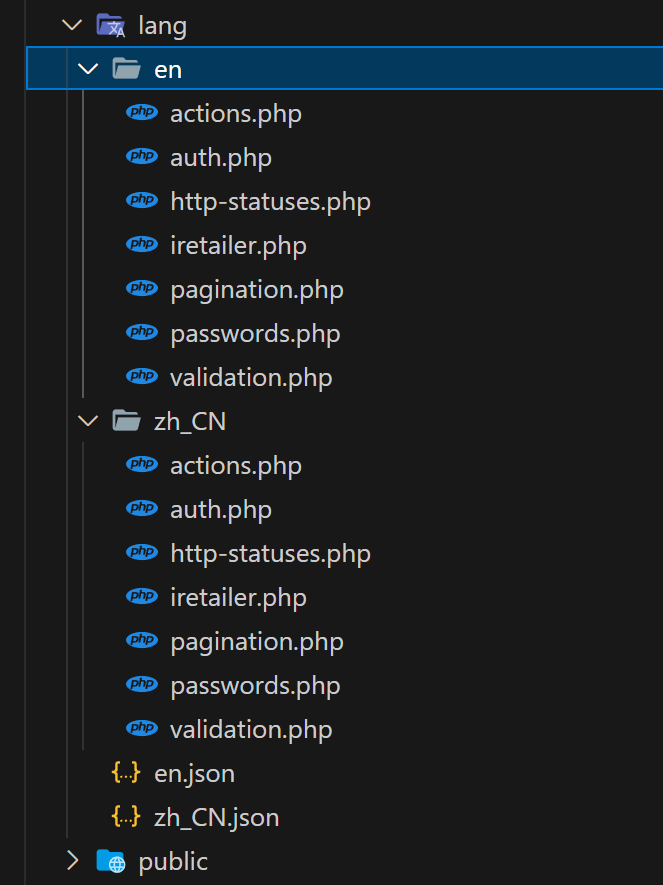
翻译文件在lang文件夹下

Laravel多语言文夹

如果要支持多语言切换,可以通过中间件实现:

php artisan make:middleware LanguageMiddleware

填写以下代码:

public function handle(Request $request, Closure $next): Response
{
	if(session()->has('locale'))
		app()->setLocale(session('locale'));
	else
		app()->setLocale(config('app.locale'));
	return $next($request);
}

HomeController中

public function setLocale($locale)
{
	session(['locale' => $locale]);
	return redirect()->back();
}

路由:

Route::get('/setLocale/{locale}', [HomeController::class, 'setLocale'])->name('home.setLocale');

视图:

<ul class="menu">
	<li><a href="{{ route('home.setLocale', ['locale'=>'zh_CN']) }}"><h3>简体中文</h3></a></li>
	<li><a href="{{ route('home.setLocale', ['locale'=>'en']) }}"><h3>English</h3></a></li>
</ul>

文本的翻译用法:

{{ __('iretailer.sign_out') }}

这句话的意思是在iretailer.php文件中找sign_out这个配置。当然,不要忘了在不同的语言文件夹中iretailer.php这个文件。

laravel上传文件

开发一个Web系统,上传文件是避免不了的,这在Laravel中实现非常简单,代码如下:

public function upload(Request $request)
{
    if ($request->hasFile('file')) {
        $file = $request->file('file');
        $fileName = Carbon::now()->timestamp . '.' . $file->getClientOriginalExtension();
        $destinationPath = 'uploads';
        $file->move($destinationPath, $fileName);
        return response()->json(['code'=>0, 'msg'=>'上传成功!', 'data'=>[
            'guarantee_file' => $fileName,
            'originalName' => $file->getClientOriginalName(),
        ]]);

        
    }

    return response()->json(['code'=>-1, 'msg'=>'请选择文件']);
}

表单不要忘记添加: enctype="multipart/form-data" 

Laravel中使用验证码

在Laravel中如果需要验证码,可以使用mews/captcha库来实现,过程如下 :

安装:

composer require "mews/captcha"

发布配置文件:

php artisan vendor:publish

前端引用:

<img src="{{captcha_src()}}" style="cursor: pointer" onclick="this.src='{{captcha_src()}}'+Math.random()">

注意,项目路径不能有中文,否则会报错:ErrorException: imagettfbbox(): Could not find/open font

简单吧,这就是生态强大的好处。

laravel下载apk文件

好像下载这个apk文件需要专门的headers,代码如下:

public function download(Request $request)
{
    $headers = [
        'Content-Type'=>'application/vnd.android.package-archive',
        'Content-Disposition'=> 'attachment; filename="android.apk"',
    ];
    return response()->download(public_path('apk/app.apk'), 'app.apk', $headers);
}

Laravel批量删除

有时,客户端会提交过来一些ID,需要删除这些ID对应的数据,代码如下:

public function destroy(Request $request): JsonResponse
{
    $customs = $request->collect();
    Custom::whereIn('id', $customs->pluck('id'))->delete();

    return response()->json(['code'=>0, 'msg'=>'删除成功!']);
}

C++14关联容器set自定义排序函数报错

十年前写的一个C++项目编译报错:“bool compatetor_asc::operator ()(const std::wstring &,const std::wstring &)”: 不能将“this”指针从“const compatetor_asc”转换为“compatetor_asc &”。

对应的代码如下 :

class compatetor_asc
{
public:
    bool operator()(const std::wstring& lhs, const std::wstring& rhs) 
    {
        return lhs < rhs ;
    }
};

这段代码重载了函数调用操作符(),可以让该类的对象能够像函数一样使用。调用的代码std::set<std::wstring, compatetor_asc> m_OriginalAsc;。

当时这个C++项目是用VS2008开发的,C++标准是C++03,现在用VS2022来编译,用的C++标准是C++14。

简单解了一下,原来从C++11开始,标准库排序谓词函数就要求必须是const成员函数了,那么只要把operator()函数改为const成员函数即可。

bool operator()(const std::wstring& lhs, const std::wstring& rhs) const
{
    return lhs < rhs ;
}

修改后再次编译,问题解决。

后记:

已经有近十年没有写过C++项目了,最初学习C++用的是VC++6.0,标准是C++98,到后来有了C++03,现如今已经到了C++23了,二十年如一梦。

Laravel打印Eloquent生成的完整SQL

开发调试中,经常需要查看Eloquent生成的SQL语句,以便排查错误,具体做法如下:

引入:use Illuminate\Support\Facades\DB;

DB::connection()->enableQueryLog(); // 开启QueryLog

$workLogs = WorkLog::where(function ($query) use ($request) {
    if ($request->has('keyword')) {
        $query->where('content', 'like', "%{$request->keyword}%");
    }
    if ($request->has('department_id')) {
        $query->with('user', function($userQuery) {
            $userQuery->where('department_id', $request->department_id);
        });
    }
})->orderByDesc('created_at')->paginate();

dd(DB::getQueryLog());