关于异常处理的感悟:
把异常都放到最外层的代码处理,封装的类中不要拦截任何异常,类库如果需要对异常进行处理,可以处理后再抛出,不要拦截。
这样方便最外层代码可以灵活的处理各种情况。
关于异常处理的感悟:
把异常都放到最外层的代码处理,封装的类中不要拦截任何异常,类库如果需要对异常进行处理,可以处理后再抛出,不要拦截。
这样方便最外层代码可以灵活的处理各种情况。
WinForm listView自动滚动,使用EnsureVisible可以让listView控件自动滚动。
如下:
ListViewItem item = new ListViewItem (info.CompanyName); //这个是第一行第一列
item.SubItems.Add(info.ZiHao); //第一行第二列
item.SubItems.Add(info.Pinyin);
item.SubItems.Add(info.Attribute);
listView1.Items.Add(item);
listView1.EnsureVisible(item.Index); //自动滚动获取当前时间:
select CURRENT_TIMESTAMP; –以格林尼治标准时间为基准
select datetime('now'); –以格林尼治标准时间为基准
获取本地当前时间:
select datetime('now', 'localtime');-- 将UNIX时间戳转化为时间日期格式
SELECT datetime(1092941466, 'unixepoch');-- 将UNIX时间戳转化为本地时间
SELECT datetime(1092941466, 'unixepoch', 'localtime');获取时间差,以秒为单位,格林尼治标准时间为基准
select strftime('%s',datetime('now')) - strftime('%s','2015-03-03 19:50:00');获取时间差,以天为单位,当前时区时间为基准
select strftime('%J', datetime('now', 'localtime')) - strftime('%J','2015-03-03 20:08:00');C#使用NPOI导出Excel
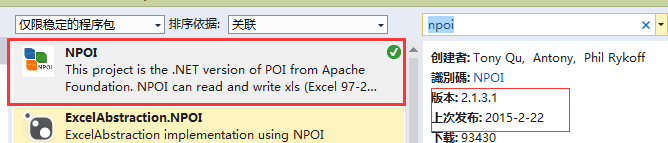
使用代码如下:
using System.Data;
using System.Configuration;
using System.Web;
using System.Web.Security;
using System.Web.UI;
using System.Web.UI.HtmlControls;
using System.Web.UI.WebControls;
using System.Web.UI.WebControls.WebParts;
using System.IO;
using System.Text;

using NPOI.HSSF.UserModel;
using NPOI.HPSF;
using NPOI.POIFS.FileSystem;
using NPOI.SS.UserModel;

namespace Common
{
    public class NPOIHelper
    {
        public void Export(System.Windows.Forms. ListView listView, string fileName)
        {
            var hssfworkbook = new HSSFWorkbook();
            ////create a entry of DocumentSummaryInformation
            DocumentSummaryInformation dsi = PropertySetFactory.CreateDocumentSummaryInformation();
            dsi.Company = "NPOI Team";
            hssfworkbook.DocumentSummaryInformation = dsi;

            ////create a entry of SummaryInformation
            SummaryInformation si = PropertySetFactory .CreateSummaryInformation();
            si.Subject = "NPOI SDK Example";
            hssfworkbook.SummaryInformation = si;


            //调整列宽
            var sheet1 = hssfworkbook.CreateSheet( "Sheet1");
            sheet1.SetColumnWidth(0, 10000);
            sheet1.SetColumnWidth(1, 10000);
            sheet1.SetColumnWidth(2, 10000);
            sheet1.SetColumnWidth(3, 10000);

            //表头
            var row0 = sheet1.CreateRow(0);
            row0.CreateCell(0).SetCellValue( "企业名称" );
            row0.CreateCell(1).SetCellValue( "中文字号" );
            row0.CreateCell(2).SetCellValue( "中文拼音" );
            row0.CreateCell(3).SetCellValue( "行业特征" );

            for( int i=0; i<listView.Items.Count; i++)
            {
                string a = listView.Items[i].SubItems[0].Text;
                string b = listView.Items[i].SubItems[1].Text;
                string c = listView.Items[i].SubItems[2].Text;
                string d = listView.Items[i].SubItems[3].Text;
                var row = sheet1.CreateRow(i+1); //如果不使用表头,这里就不用+1了
                row.CreateCell(0).SetCellValue(a);
                row.CreateCell(1).SetCellValue(b);
                row.CreateCell(2).SetCellValue(c);
                row.CreateCell(3).SetCellValue(d);
            }


            //Write the stream data of workbook to the root directory
            //MemoryStream file = new MemoryStream();
           // hssfworkbook.Write(file);

            //写入文件
            FileStream file = new FileStream (fileName, FileMode.Create);
            hssfworkbook.Write(file);
            file.Close();


        }
    }
}
调用:
注意先using Common;
/*保存对话框*/
SaveFileDialog saveFileDialog = new SaveFileDialog ();
saveFileDialog.Filter = "导出Excel(*.xls)|*.xls";

if (saveFileDialog.ShowDialog() == DialogResult.OK)
{
    NPOIHelper npoi = new NPOIHelper();
    npoi.Export(this.listView1, saveFileDialog.FileName);
    MessageBox.Show( "导出完成!" );

}C# Http GET 和POST HttpClient HttpHelper
using System;
using System.Collections.Generic;
using System.IO;
using System.Linq;
using System.Net;
using System.Text;
using System.Threading.Tasks;
namespace alimama
{
    class HttpHelper
    {
        private static CookieContainer cookieContainer = new CookieContainer();
        private static int _timeOut = 1000 * 30; // 30秒超时  默认值是 100,000 毫秒(100 秒)
        static public string HttpGet(string url, string referer = "")
        {
            HttpWebRequest httpWebRequest = null;
            HttpWebResponse httpWebResponse = null;
            httpWebRequest = (HttpWebRequest)HttpWebRequest.Create(url);
            httpWebRequest.CookieContainer = cookieContainer;
            httpWebRequest.Method = "GET";
            httpWebRequest.ServicePoint.ConnectionLimit = int.MaxValue;
            if (!string.IsNullOrEmpty(referer))
            {
                httpWebRequest.Referer = referer;
            }
            //httpWebRequest.Host = Host;
            httpWebRequest.UserAgent = "Mozilla/5.0 (Windows NT 6.1) AppleWebKit/537.36 (KHTML, like Gecko) Chrome/31.0.1650.63 Safari/537.36";
            httpWebRequest.KeepAlive = true;
            httpWebRequest.Accept = "text/html,application/xhtml+xml,application/xml;q=0.9,*/*;q=0.8";
            httpWebRequest.ServicePoint.Expect100Continue = false;
            httpWebRequest.Timeout = _timeOut; //默认值是 100,000 毫秒(100 秒)
            httpWebResponse = (HttpWebResponse)httpWebRequest.GetResponse();
            Stream responseStream = httpWebResponse.GetResponseStream();
            StreamReader streamReader = new StreamReader(responseStream, Encoding.UTF8);
            string html = streamReader.ReadToEnd();
            streamReader.Close();
            responseStream.Close();
            httpWebRequest.Abort();
            httpWebResponse.Close();
            return html;
        }
        static public string HttpPost(string url, string postData, string referer = "")
        {
            HttpWebRequest httpWebRequest = null;
            HttpWebResponse httpWebResponse = null;
            httpWebRequest = (HttpWebRequest)HttpWebRequest.Create(url);
            httpWebRequest.CookieContainer = cookieContainer;
            httpWebRequest.Method = "POST";
            httpWebRequest.ServicePoint.ConnectionLimit = int.MaxValue;
            if (!string.IsNullOrEmpty(referer))
            {
                httpWebRequest.Referer = referer;
            }
            //httpWebRequest.Host = Host;
            httpWebRequest.UserAgent = "Mozilla/5.0 (Windows NT 6.1) AppleWebKit/537.36 (KHTML, like Gecko) Chrome/31.0.1650.63 Safari/537.36";
            httpWebRequest.KeepAlive = true;
            httpWebRequest.ContentType = "application/x-www-form-urlencoded; charset=UTF-8";
            httpWebRequest.ServicePoint.Expect100Continue = false;
            httpWebRequest.Timeout = _timeOut; //默认值是 100,000 毫秒(100 秒)
            byte[] byteArray = Encoding.UTF8.GetBytes(postData); //转化
            httpWebRequest.ContentLength = byteArray.Length;
            Stream newStream = httpWebRequest.GetRequestStream();
            newStream.Write(byteArray, 0, byteArray.Length); //写入参数
            newStream.Close();
            httpWebResponse = (HttpWebResponse)httpWebRequest.GetResponse();
            Stream responseStream = httpWebResponse.GetResponseStream();
            StreamReader streamReader = new StreamReader(responseStream, Encoding.UTF8);
            string html = streamReader.ReadToEnd();
            streamReader.Close();
            responseStream.Close();
            httpWebRequest.Abort();
            httpWebResponse.Close();
            return html;
        }
        static public void Download(string url, string savePath)
        {
            HttpWebRequest request = (HttpWebRequest)WebRequest.Create(url);
            request.CookieContainer = cookieContainer;
            WebResponse response = request.GetResponse();
            Stream reader = response.GetResponseStream();
            FileStream writer = new FileStream(savePath, FileMode.OpenOrCreate, FileAccess.Write);
            byte[] buff = new byte[512];
            int c = 0; //实际读取的字节数
            while ((c = reader.Read(buff, 0, buff.Length)) > 0)
            {
                writer.Write(buff, 0, c);
            }
            writer.Close();
            writer.Dispose();
            reader.Close();
            reader.Dispose();
            response.Close();
        }
    }
}ScrapySharp + HtmlAgilityPack
这两个库基本可以完成98%的采集需求,剩下的2%可以再加一个库: phantomjs
目前接到的需求中,还没有使用到 phantomjs这个库。
补充(2015-3-9):
今天又发现了几个和采集网页相关的库(以下4个都没用过,先记下来)
ScrapySharp + HtmlAgilityPack 基本用法举例:
string htmlstr = HttpHelper.HttpPost(“http://www.tzgsj.gov.cn/baweb/show/shiju/queryByName.jsp” , “spellcondition=%E9%BE%99” );
HtmlDocument doc = new HtmlDocument ();
doc.LoadHtml(htmlstr);
HtmlNode docNode = doc.DocumentNode;
var nodes = docNode.CssSelect(“#content” );
这样就拿到了所有ID为content的DOM元素。
这段HTML如下:
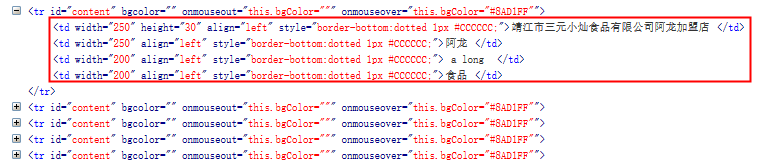
为了进一步拿到里面的td的文字,可以接着这样写:
foreach(var node in nodes)
{
    var tdNodes = node.CssSelect( "td");
    foreach(var td in tdNodes)
    {
        string text = td.InnerText;
    }
}
经过这个双重循环后,所有的td里的内容就都被采集出来了。
总结,ScrapySharp 主要是这个CssSelect好用。它是HtmlAgilityPack的一个扩展
EnumWindows遍历窗口
#include <vector>
using namespace std;


vector<HWND > m_hWnds;
BOOL EnumWindowsProc(HWND hWnd , LPARAM lParam )
{
    if (::GetWindowLong( hWnd, GWL_STYLE)& WS_VISIBLE)
    {
        char szClassName[128] = { 0 };
        if (::GetClassNameA( hWnd, szClassName, 128) != 0)
        {
            if (strcmp( "3DSMAX", szClassName) == 0)
            {
                m_hWnds.push_back( hWnd);
            }
        }

    }
    return TRUE;
}

int Get3dmaxWndCount()
{
    m_hWnds.clear();
    ::EnumWindows((WNDENUMPROC)EnumWindowsProc, NULL);

    return (int)m_hWnds.size();
}从$arr中删除值为$RoomID的元素
$key = array_search ($RoomID, $arr);
if ($key !== false)
array_splice ($arr, $key, 1);其实这个问题不关IIS以及PHP什么事,是我的权限没设置好。
在使用PHP上传文件时,一直报错,错误信息如下:
PHP Warning: move_uploaded_file(): Unable to move ‘C:\Windows\Temp…
一开始以为是C:\Windows\Temp的权限问题,结果加上IUSR,并给予所有权限后,还是不行。
然后又给uploads文件夹给IUSR账户所有权限,结果还是不行。
最后在uploads文件上给IIS_IUSERS账户加上所有权限后,问题解决。
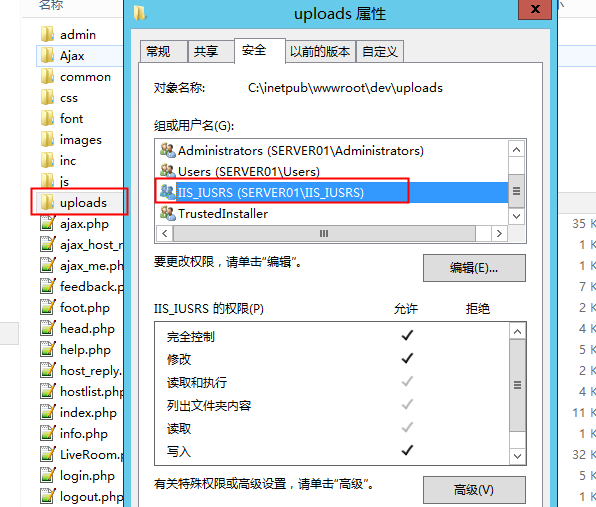
总结:
问题的主要原因是我没有弄清楚IIS的两个账户分别是什么意思,关于IUSR和IIS_IUSER的区别。
简单查了一下,知道 IUSR is part of IIS_IUSER group
仿站最好的办法是用自己的代码去实现目标网站的效果,而不是去分析目标网站是怎么实现的,套用目标网站的代码。 否则会越做越做不下去一开始可能是想偷懒,觉得这样快,但是,这样想就错了,后面就做不下去了。
2024.11.25记:前几天仿了一个站,再次认同自己9年前的这个想法!