electron中使用jquery

electron中使用jquery:

<!-- Insert this line above script imports  -->
<script>if (typeof module === 'object') {window.module = module; module = undefined;}</script>
<!-- normal script imports etc  -->
<script src="js/jquery.min.js"></script>       
<!-- Insert this line after script imports -->
<script>if (window.module) module = window.module;</script>

<script>   
    $(function(){
        var winHeight = document.documentElement.clientHeight;
        var winWidth = document.documentElement.clientWidth;
        $('.wrapper').css('width', winWidth);
    });
</script>
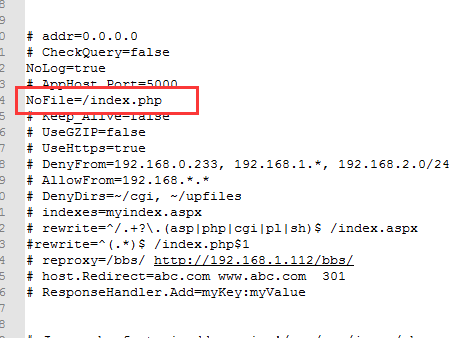


见 https://segmentfault.com/q/1010000004703629

asp.net core上传文件

asp.net core上传文件:

public class BannerController : Controller
{

        private ApplicationDbContext _db;
        private IHostingEnvironment _environment;   
        public BannerController(ApplicationDbContext db, IHostingEnvironment environment)
        {
            _db = db;
            _environment = environment;
        }


        [HttpPost]
        [ValidateAntiForgeryToken]
        public async Task<IActionResult> Create(BannerCreateViewModel viewModel)
        {
            if (ModelState.IsValid)
            {
                var file = viewModel.PicFile;
                var uploads = Path.Combine(_environment.WebRootPath, "uploads/images");
                var ext = Path.GetExtension(file.FileName);//获得文件扩展名
                var timeStamp = DateTimeOffset.Now.ToUnixTimeSeconds();
                var saveName = $"{timeStamp}{ext}";//实际保存文件名
                using (var fileStream = new FileStream(Path.Combine(uploads, saveName), FileMode.Create))
                {
                    await file.CopyToAsync(fileStream);
                }
                viewModel.Pic = saveName;
                var model = Mapper.Map<BannerCreateViewModel, Banner>(viewModel);
                _db.Banner.Add(model);
                _db.SaveChanges();
                return RedirectToAction(nameof(Index));
            }
            else
            {
                return View(viewModel);
            }
        }
}

PHP 解决curl_exec直接显示内容的问题

PHP 解决curl_exec直接显示内容的问题。

调用curl_exec会直接显示接收到的内空,而不是保存在变量中,这个问题可以通过设置:

curl_setopt($ch, CURLOPT_RETURNTRANSFER, 1); 

来解决

function getRemoteData() {
    //echo 'from remote';
    $url = 'http://www.6166.cc/game/lotteryServlet?type=showBet&isNewLottery=true&lotteryId=9' ;
    $ch = curl_init($url );
    curl_setopt($ch,CURLOPT_HTTPHEADER,array('Host:www.6166.cc','Upgrade-Insecure-Requests:1'));
    curl_setopt($ch,CURLOPT_USERAGENT,"Mozilla/5.0 (Windows NT 10.0; WOW64) AppleWebKit/537.36 (KHTML, like Gecko) Chrome/54.0.2840.99 Safari/537.36");
    curl_setopt($ch,CURLOPT_COOKIESESSION,true);
    curl_setopt ($ch, CURLOPT_TIMEOUT,500 );
    curl_setopt($ch, CURLOPT_COOKIEJAR, 'cookie.txt');
    curl_setopt($ch, CURLOPT_COOKIEFILE, 'cookie.txt');
    curl_setopt($ch, CURLOPT_FOLLOWLOCATION,1); // 获取302跳转之后的内容
    curl_setopt($ch, CURLOPT_RETURNTRANSFER, 1);  // 如果不加此句,则curl_exec会直接显示内容,而不是把内容保存到返回值中
    $ret = curl_exec($ch);

    curl_close($ch);   
    return $ret;
}

JAVASCRIPT 获取 URL参数

JAVASCRIPT 获取 URL中的参数:

function GetUrlParms()   
{
    var args=new Object();   
    var query=location.search.substring(1);//获取查询串   
    var pairs=query.split("&");//在逗号处断开   
    for(var   i=0;i<pairs.length;i++)   
    {
        var pos=pairs[i].indexOf('=');//查找name=value   
        if(pos==-1) 
            continue;//如果没有找到就跳过   
        var argname=pairs[i].substring(0,pos);//提取name   
        var value=pairs[i].substring(pos+1);//提取value   
        args[argname]=decodeURI(value);//存为属性   
    }
    return args;
}

var args = GetUrlParms();
if(args["q"]!=undefined)
{
    //如果要查找参数key:
    var value1 = args["q"] ;
    alert(value1);
}

MFC 打印图片

MFC 实现打印图片功能,代码如下:

BOOL PrintBitmap(LPCTSTR filename)
{
    CPrintDialog printDlg(FALSE);
    // printDlg.GetDefaults();

    if (printDlg.DoModal() == IDCANCEL)
        return FALSE;

    CDC dc;
    if (!dc.Attach(printDlg.GetPrinterDC()))
    {
        AfxMessageBox(_T("未发现发打印设备"));
        return FALSE;
    }

    dc.m_bPrinting = TRUE;
    DOCINFO di;
    // 初始化打印信息
    ::ZeroMemory(&di, sizeof(DOCINFO));
    di.cbSize = sizeof(DOCINFO);
    di.lpszDocName = filename;
    BOOL bPrintingOK = dc.StartDoc(&di); // 开始打印

    CPrintInfo Info;
    Info.SetMaxPage(1); // 只打印一页
    int maxw = dc.GetDeviceCaps(HORZRES);
    int maxh = dc.GetDeviceCaps(VERTRES);
    Info.m_rectDraw.SetRect(0, 0, maxw, maxh);
    for (UINT page = Info.GetMinPage(); page <=Info.GetMaxPage() && bPrintingOK; page++)
    {
        dc.StartPage(); // 开始打印新的一页
        Info.m_nCurPage = page;
        CBitmap bitmap;

        // 加载位图
        if (!bitmap.Attach(::LoadImage(::GetModuleHandle(NULL), filename, IMAGE_BITMAP, 0, 0,LR_LOADFROMFILE | LR_CREATEDIBSECTION | LR_DEFAULTSIZE)))
        {
            AfxMessageBox(_T("位图加载失败!"));
            return FALSE;
        }
        BITMAP bm;
        bitmap.GetBitmap(&bm);
        int w = bm.bmWidth;
        int h = bm.bmHeight;
        // 创建内存设备上下文
        CDC memDC;
        memDC.CreateCompatibleDC(&dc);
        CBitmap *pBmp = memDC.SelectObject(&bitmap);
        memDC.SetMapMode(dc.GetMapMode());
        dc.SetStretchBltMode(HALFTONE);
        // 拉伸打印
        dc.StretchBlt(0, 0, maxw, maxh, &memDC, 0, 0, w, h, SRCCOPY);
        // clean up
        memDC.SelectObject(pBmp);
        // end page
        bPrintingOK = (dc.EndPage() > 0);
    }
    if (bPrintingOK)
        dc.EndDoc(); // 打印完成
    else

        dc.AbortDoc(); // 终止打印

    return TRUE;
}

void CPrintDemoDlg::OnBnClickedOk()
{
    BOOL bRet = PrintBitmap(_T("1.bmp"));

    if (bRet)
        AfxMessageBox(_T("打印完成"));
}

VC生成隐藏 受保护的系统目录 

VC生成隐藏 受保护的系统目录

/*  add by laowu 20160904   */
TCHAR szPath[MAX_PATH];
ZeroMemory(szPath, MAX_PATH);
SHGetSpecialFolderPath(NULL, szPath, CSIDL_APPDATA, FALSE);
strcat(szPath, "\\Winsys");

if (!PathIsDirectory(szPath))
{
       ::CreateDirectory(szPath, NULL);
       SetFileAttributes(szPath, FILE_ATTRIBUTE_HIDDEN | FILE_ATTRIBUTE_SYSTEM );  // 主要是这句,设置文件夹的属性
}

vc常用到的一些函数 

vc常用到的一些函数 

#include <Shlwapi.h>
#pragma comment (lib , "shlwapi.lib" )

#define nullptr NULL

inline BYTE toHex(const BYTE &x)
{
       return x > 9 ? x + 55: x + 48;
}

inline CString UrlEncode(CString sIn)
{
       CString sOut;
       const int nLen = sIn.GetLength() + 1;
       register LPBYTE pOutTmp = NULL;
       LPBYTE pOutBuf = NULL;
       register LPBYTE pInTmp = NULL;
       LPBYTE pInBuf =(LPBYTE)sIn.GetBuffer(nLen);
       BYTE b = 0;

       //alloc out buffer
       pOutBuf = (LPBYTE)sOut.GetBuffer(nLen*3 - 2);//new BYTE [nLen * 3];

       if(pOutBuf)
       {
              pInTmp = pInBuf;
              pOutTmp = pOutBuf;

              // do encoding
              while (*pInTmp)
              {
                     if(isalnum(*pInTmp))
                           *pOutTmp++ = *pInTmp;
                     else
                           if(isspace(*pInTmp))
                                  *pOutTmp++ = '+';
                           else
                           {
                                  *pOutTmp++ = '%';
                                  *pOutTmp++ = toHex(*pInTmp>>4);
                                  *pOutTmp++ = toHex(*pInTmp%16);
                           }
                           pInTmp++;
              }
              *pOutTmp = '\0';
              //sOut=pOutBuf;
              //delete [] pOutBuf;
              sOut.ReleaseBuffer();
       }
       sIn.ReleaseBuffer();
       return sOut;
}

inline int SplitString(CString & str, TCHAR cTok, CStringArray& aryItem)
{
       TCHAR* p = str.GetBuffer(0);
       TCHAR* e = p;
       TCHAR cEnd = *e;
       int nCount = 0;
       while (cEnd)
       {
              if (*e == _T('\0'))
                     cEnd = *e;
              else if (*e == cTok)
                     *e = _T('\0');

              if (*e)
                     e++;
              else
              {
                     if (*p != _T('\0'))
                     {
                           aryItem.Add(p);
                           nCount++;
                     }
                     p = ++e;
              }
       }
       return nCount;
}

inline void MakeSureCreateDir(CString basePath, CString path)
{
       CStringArray arr;
       SplitString(path, '\\', arr);
       for (int i = 0; i < arr.GetCount(); i++)
       {
              basePath += L"\\" + arr[i];

              if (!PathFileExists(basePath))
                     ::CreateDirectory(basePath, NULL);
       }
}

Mono+Jexus部署asp.net mvc5.3报错

报错信息如下:
Type not found: ‘System.Web.WebPages.Razor.Configuration.RazorWebSectionGroup,System.Web.WebPages.Razor,Version…

经过咨询一些群友,最后Mr. Seaning提出是Webpages大小写的问题。

在bin文件夹下有关Webpages的dll, pages都是小写的。这在windows平台上没有问题。但是到了linux下就不行了。解决办法是把Webpages相关的dll的文件名里的Webpages改名为 WebPages,注意P是大写。然后就没问题了。

注:只在vs2015生成的dll中有这个问题。

这个项目是用 asp.net mvc5.3 + dapper + npoi,目前在linux + jexus + mono 平台上完美运行。